The purpose of a password for OKX Wallet is to secure the app and manage the wallet. You need to set a password when creating or importing a wallet which will be needed for later use, such as login and transfer. As a non-custodial and decentralized multi-chain wallet, OKX Wallet doesn't store your wallet password nor help you retrieve it. You can only reset your wallet password by re-importing the seed phrase or private keys, so it's strongly advised you back up your seed phrase or private keys. Otherwise, forgetting your wallet password means permanently losing your assets in the wallet.
Note: The above-mentioned password refers to your wallet password instead of the login password and fund password of the OKX app. If you forget the relevant passwords for the OKX app, check How to change my login password? (App) and How to change my login password? (Web)for more details.
2. How to reset my password?
Resetting a wallet means restoring OKX Wallet to its initial state. It wipes out all the seed phrases, private keys, and wallet data. Once the reset is complete, you need to re-enter the seed phrase or private key to access the wallet. Open OKX Wallet, click Settings > Wallet security > Reset wallet.
3. How to import a wallet?
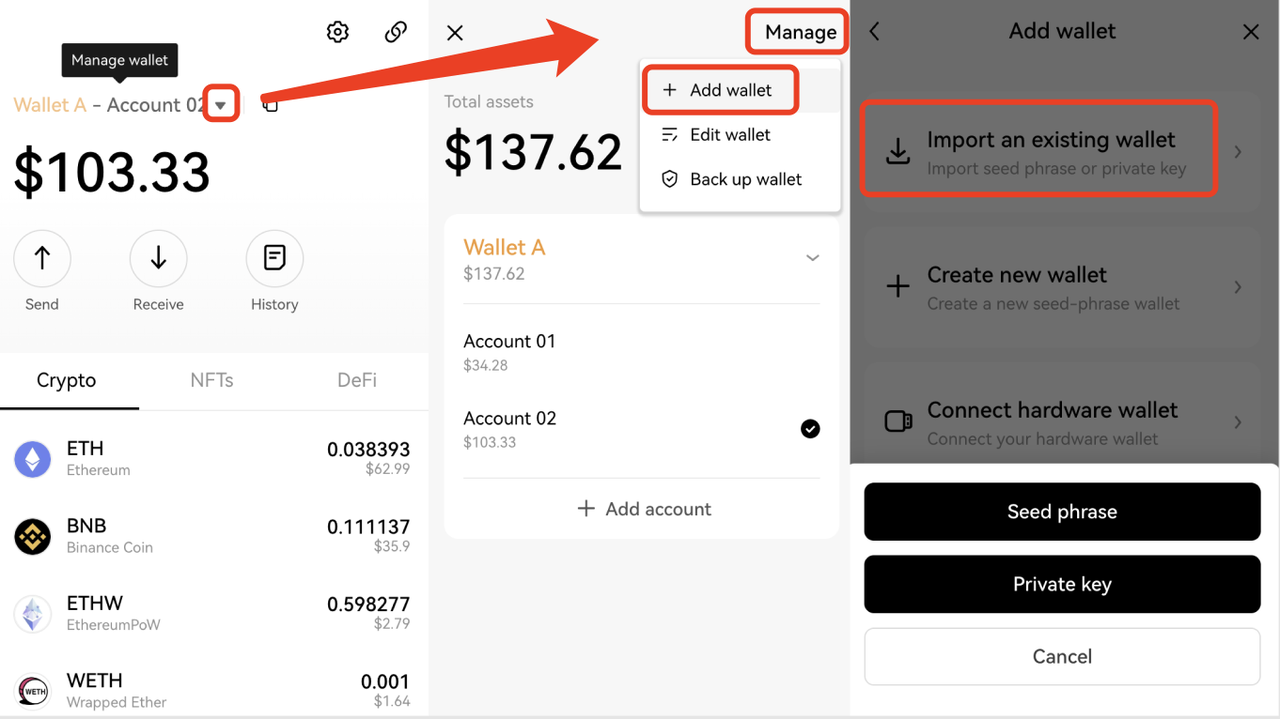
Open OKX Wallet, click ▼ > Manage > Add wallet to import an existing wallet, and select seed phrase or private key.
4. Why can't I find the account after importing the seed phrase?
If you import your seed phrase into the OKX Wallet but find that the imported wallet isn't the account you need, it may be because:
You have multiple seed phrases, and the imported wallet isn't the one you want to restore. You can use the correct seed phrase to re-import your wallet.
The wallet account you're looking for is a derived account of the imported wallet. It's recommended to add an account under the wallet to see if the account you're looking for is in it.
Your seed phrase isn't generated in the OKX Wallet. You can go to the wallet app that created the seed phrase to try re-importing.
5. Why do I need to back up seed phrases or private keys? How to back it up?
Your ownership and control of the wallet seed phrase or private key are necessary for managing the assets in your wallets. If you lose the seed phrase or private key, you will permanently lose the assets in your wallets.
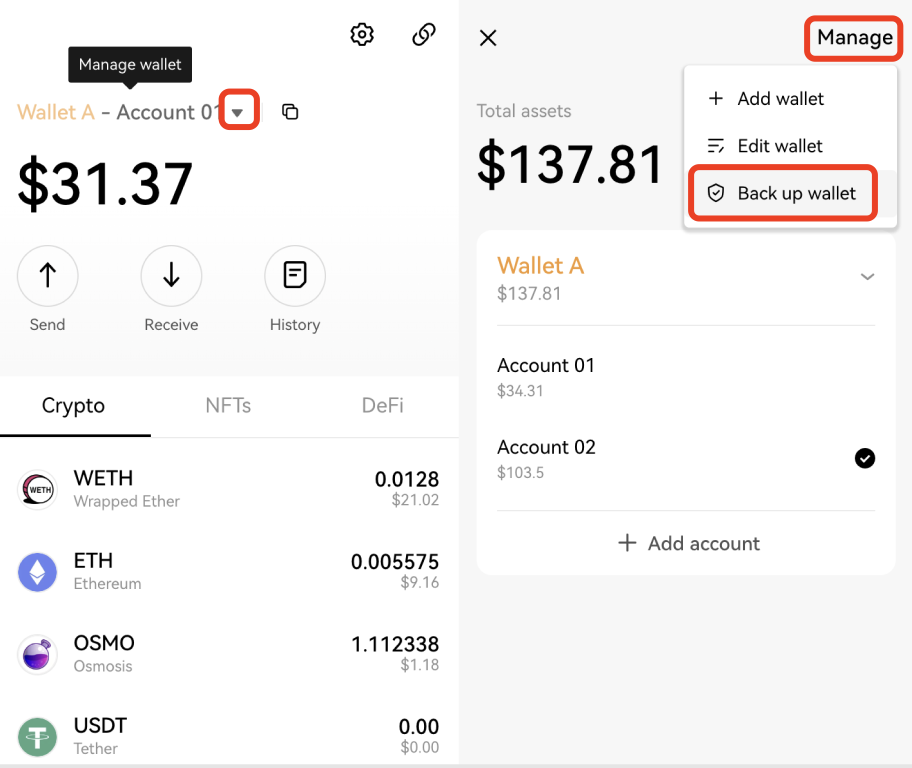
To back up your seed phrase or private keys, you need to open OKX Wallet, and click ▼ > Manage > Back up wallet.
6. How to delete an account?
Consistent with blockchain features, you can't delete an account once you create it. But you can remove it from the wallet.
For the derived accounts of the wallet created or imported with a seed phrase, such as Account 01 - Account 10 of Wallet A, if you need to remove Account 05, you need to remove the entire wallet from your device and import it with the seed phrase again.
For the wallet imported with private keys, you can remove the wallet.
7. Why can't I find one crypto?
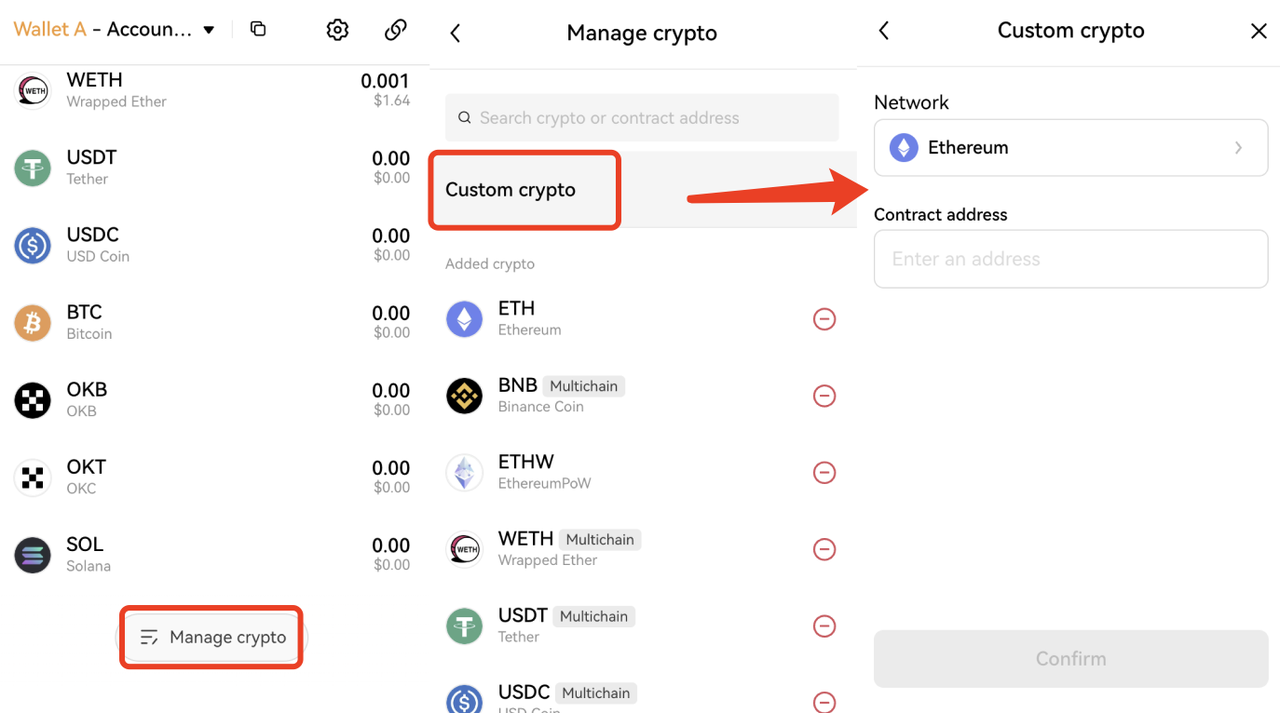
If the crypto you want to receive isn't in the added crypto, you can click Manage crypto > Custom crypto, select a network, enter the contract address, and click Confirm to add it.
8. How to cancel or replace a pending Ethereum transaction?
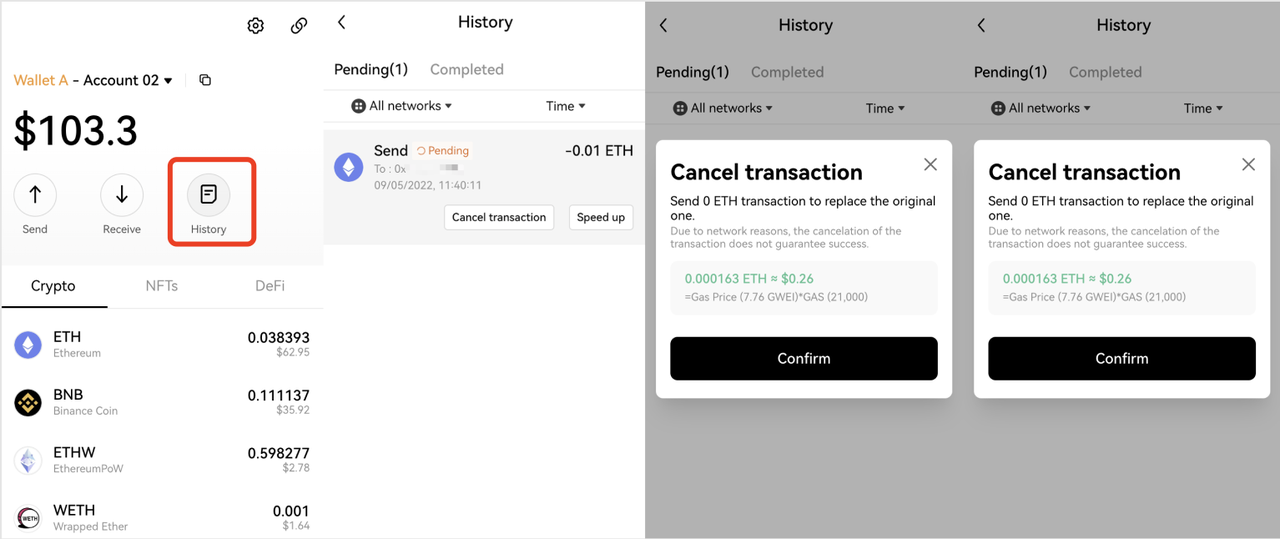
Click History on the wallet homepage, find the issued transaction in Pending, and click Cancel transaction or Speed up as needed.
9. Do I need to pay network fees for failed transactions?Yes. You need to pay a network fee for processing the transaction when you initiated operations, such as sending/transferring crypto on the network. Since there's network resource consumption while processing the transaction, you have to pay for it whether the transaction succeeds or fails. OKX Wallet doesn't charge this network fee and is unable to refund it.
10. If I enter the wrong address, can I get my money back?
Unfortunately, once the transfer is successful, it can't be canceled or revoked due to the features of blockchain. You need to recall the source of the receiving address to see if there's a remedy:
If the receiving address you entered is from another platform, you can contact the platform staff to return your money.
If the receiving address is the contract address of crypto, you can contact the project staff to see if they can transfer your money back.
11. How to change the language of OKX Wallet?
Open OKX Wallet, click Settings > Preferences > Language.
12. Where can I suggest new features or improvements?
We'd love to hear about your experience and suggestions for using OKX Wallet. You can contact us in the following ways:
1)Click the profile icon > Support center > FAQs for help. If FAQs can't solve your problem, you can click Chat with us for support.
2)Give feedback via the community of Discord.