OKX Wallet is a non-custodial and decentralized multi-chain wallet that provides one-stop asset management, secure storage, transfer, and other features for global users. OKX Wallet helps users more securely and conveniently manage assets on multiple networks such as Bitcoin and Ethereum on many devices (iOS, Android, and web extension) by using a seed phrase to generate an on-chain identity. Meanwhile, it supports multi-seed phrase import and derivation of addresses.
Currently, OKX Wallet supports 40 networks, including Bitcoin, Ethereum, OKC, Solana, BSC, Polygon, Avalanche, Tron, Arbitrum, etc. It can automatically recognize and connect to different networks without switching. OKX Wallet has multi-chain and cross-chain DEX, Yield farming, NFT Marketplace, and DApp Discover. You can easily access over 1,000 DApp protocols and explore the Web3 world with only one wallet.
1. Download OKX Wallet extension
Chrome web store download address: https://chrome.google.com/webstore/detail/okx-wallet/mcohilncbfahbmgdjkbpemcciiolgcge
Firefox browser add-ons download address: https://addons.mozilla.org/en-US/firefox/addon/okexwallet/
2. Create a wallet or add an existing wallet
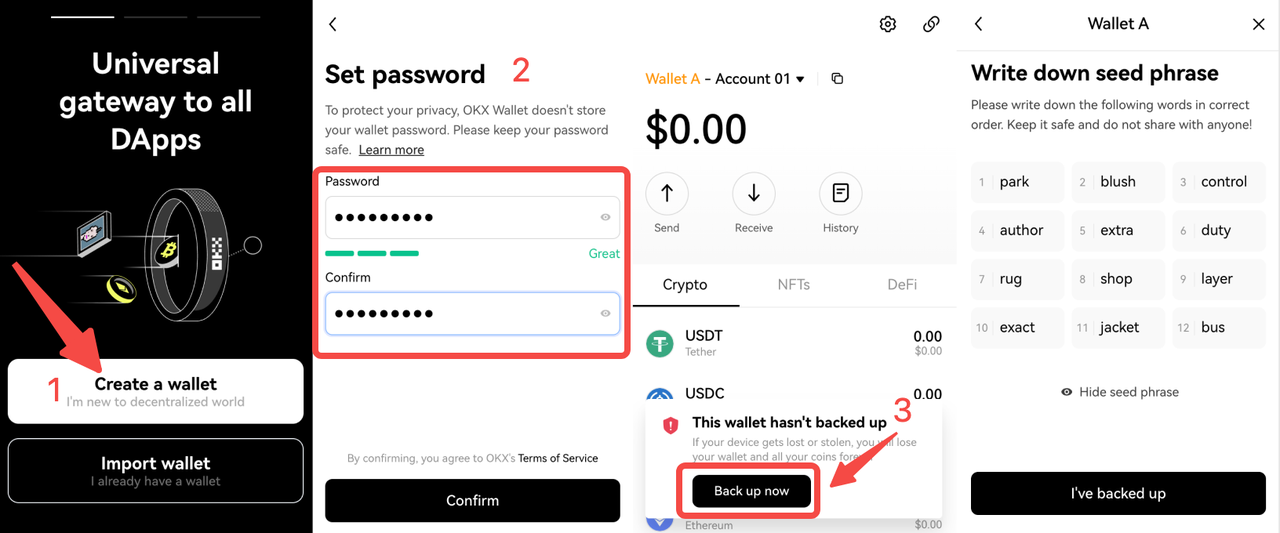
[1] Open the OKX Wallet extension, select Create wallet;
[2] Create your own password;
[3] Back up your seed phrase (aka. Recovery phase).
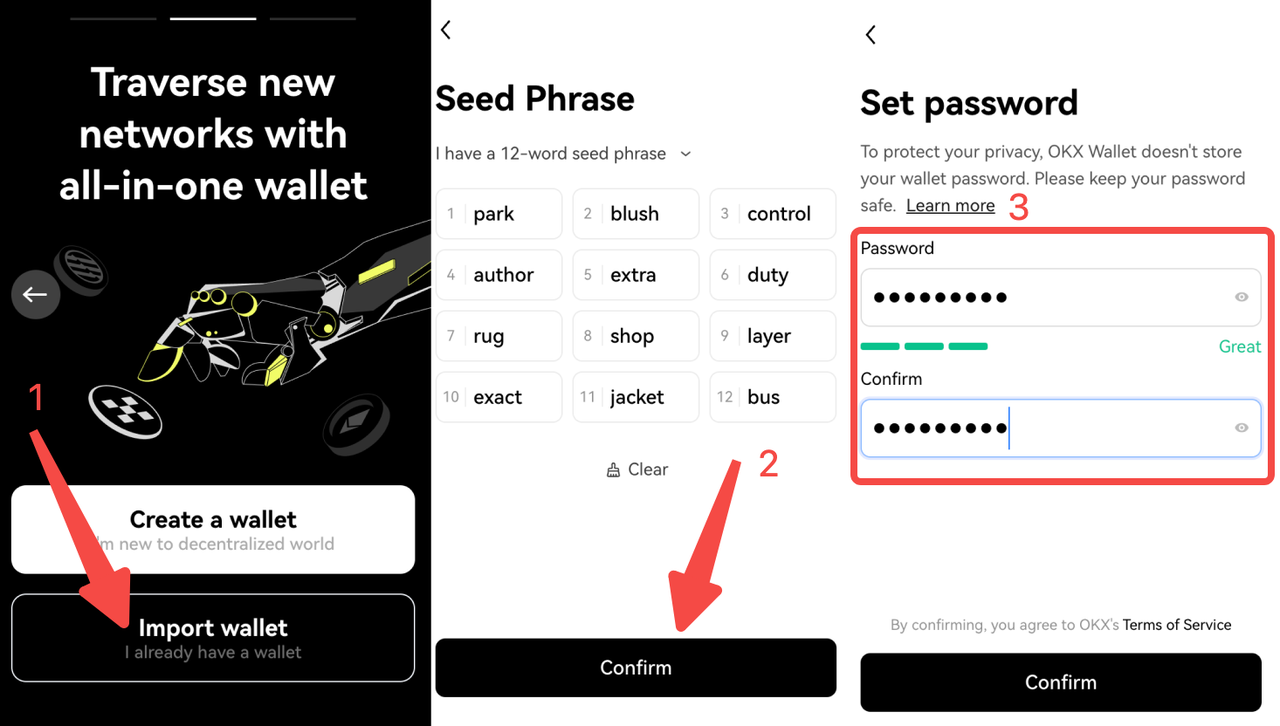
If you already have a wallet, import your existing wallet into OKX Wallet, using your wallet's seed phrase or private key.
[1] Click Import wallet, select seed phrase or private key, and enter it;
[2] Entering the seed phrase or private key;
[3] Go to the Set password page, enter your password, and complete importing.
Note: Keep your seed phrase and password safe and never share it with anyone to protect your assets.
3. How to view or back up a seed phrase or private key?
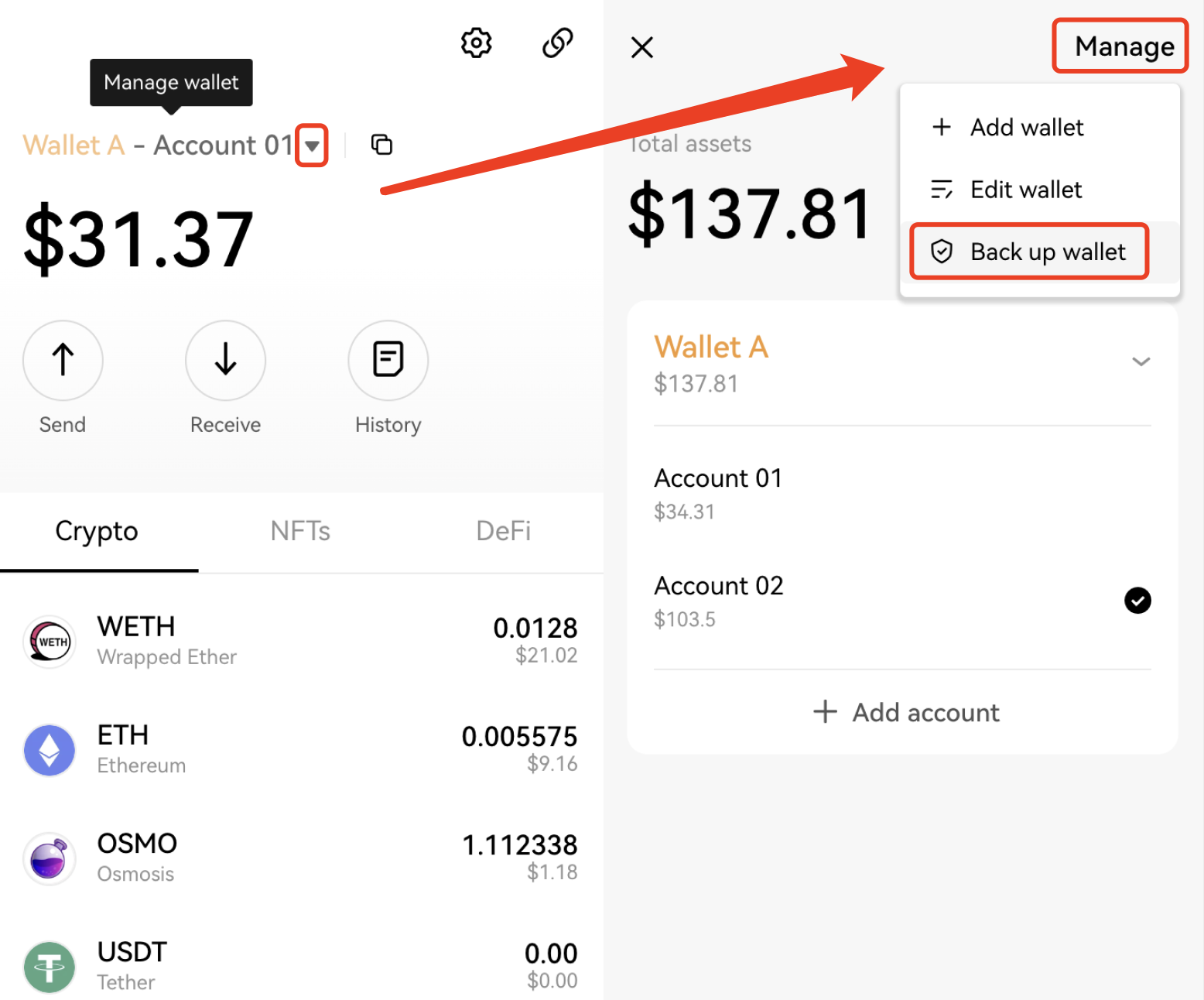
Open OKX Wallet extension, and click ▼ > Manage > Back up wallet.
If you've backed up a seed phrase, OKX Wallet recognizes it as the unique identifier to the wallet (also to the derived wallets generated from that wallet), which means that you can manage crypto assets on 40 networks with this seed phrase. If it's a private key that you backed up, please be reminded that your wallet may correspond to different private keys depending on the networks.
4. How to create a new account?
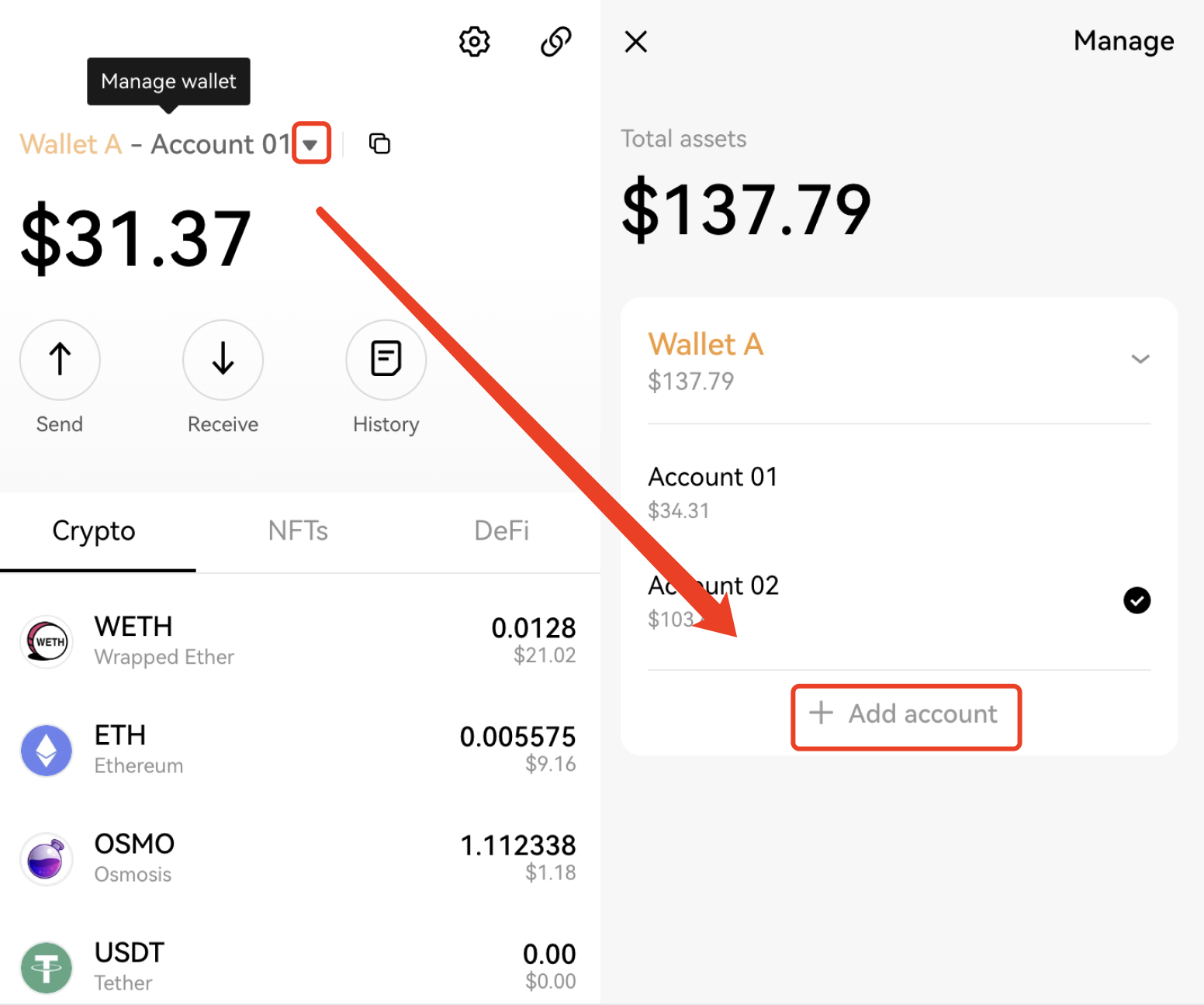
Click ▼ > Add account to create a new account, e.g., the accounts of Wallet A sharing one seed phrase are often referred to as derived wallets. You can also rename the wallets and accounts, click ▼ > Manage > Edit wallet.
For the derived accounts of the wallet created or imported with a seed phrase, such as Account 01 - Account 10 of Wallet A, if you need to remove Account 05, you need to remove the entire wallet from your device and import it with the seed phrase again. For the wallet imported with private keys, you can remove the wallet.
5. How to use a watch-only wallet?
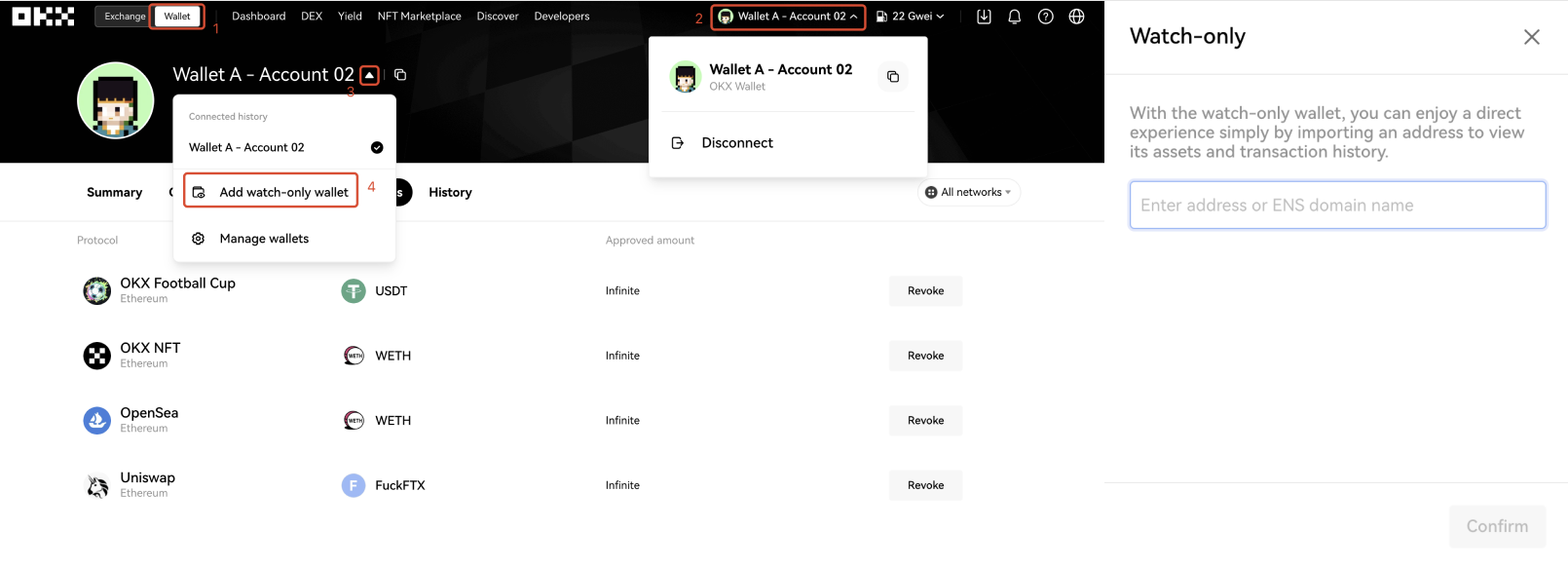
The watch-only wallet refers to a wallet that imports an address or ENS domain name to view the assets, NFT, DeFi, approvals, transaction history, etc., held by the address. The watch-only wallet can be seen as a blockchain browser for a specific address.
Compared with the blockchain browser, the watch-only wallet has some advantages: 1) more than one watch-only wallet can be added for easier tracking, and 2) multiple networks are aggregated in the same wallet. Currently, 40 networks are available in OKX Wallet. The watch-only wallet can display the assets on 40 networks and the asset allocation on different networks, avoiding the trouble of switching back and forth between browsers of different networks.
Open OKX Web3 website, click Dashboard > Connect wallet > ▼ > Add watch-only wallet.
Since only the address or ENS domain name is imported, you can't directly complete operations in the watch-only wallet, such as transfers. If you want to complete other operations, you need to import the seed phrase/private key into the wallet or use it with the approved cold wallet.
6. How to discover a DApp?
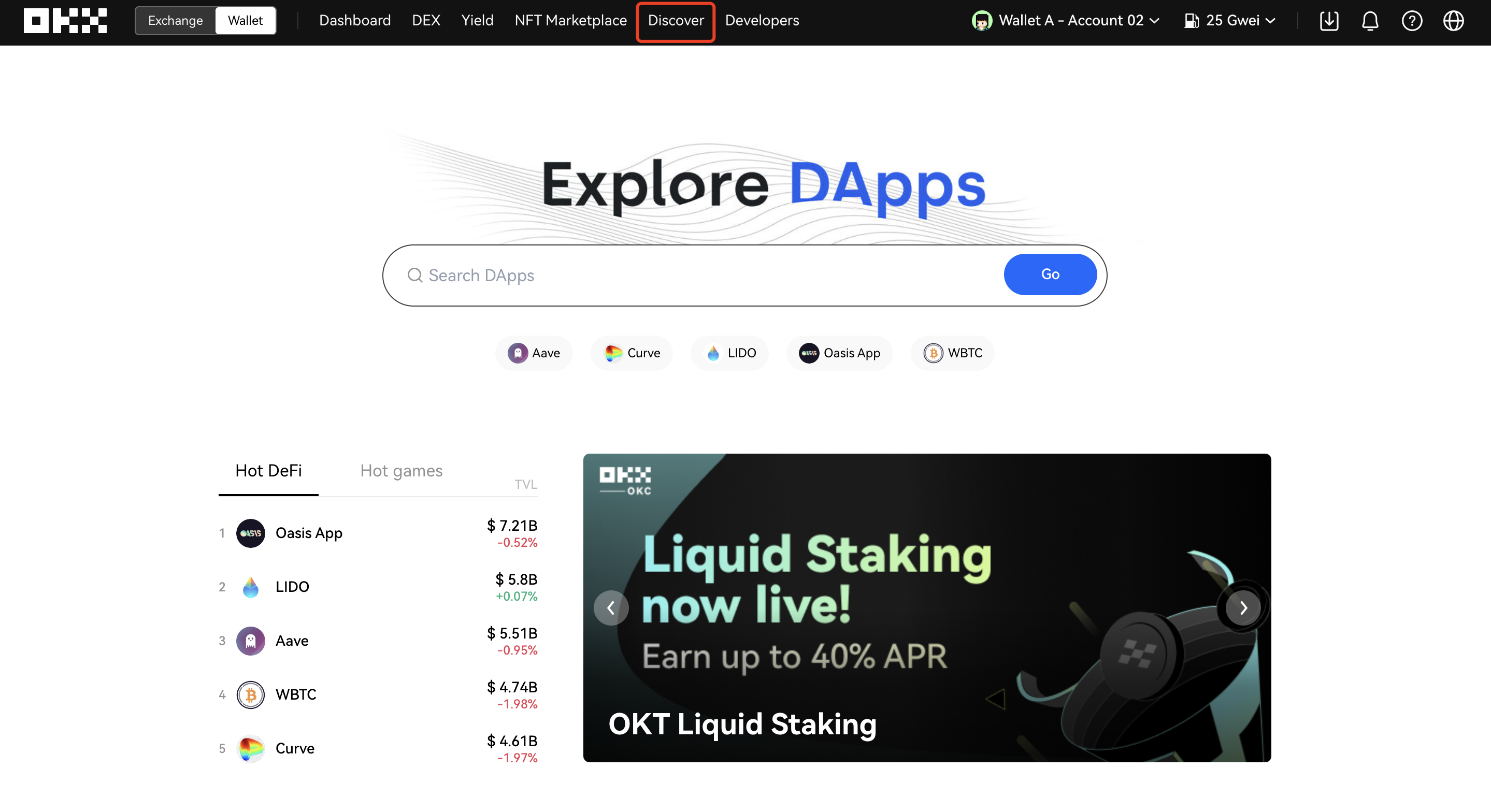
OKX Wallet provides a Discover portal that aggregates massive DApp interfaces. The data assisting decision-making, such as DApp-related users, traffic, and transaction volume, is available on the Web. Search and click on the DApp name to instantly jump to the DApp homepage.