
Fiat-Währungen
Kryptowährungen
Keine Ergebnisse für ""
Wir konnten nichts finden, das zu Deiner Suche passt.Versuche es noch einmal mit einem anderen Begriff.

Unterstützte Ketten


Sicherheitsinformationen
PhantomInfo
What Is Phantom Wallet?
Phantom is a browser crypto wallet. Phantom makes it safe & easy for you to store, send, receive, stake, and swap tokens on the Solana blockchain. Phantom unlocks a simple and secure way to interact with blockchain-based applications directly from your favorite web browser.
What Are the Main Features of Phantom Wallet?
Phantom has everything you need to traverse the Solana ecosystem.
- Non-Custodial
We never have access to any of your data or funds. Ever.
- Token Swaps
Use our built-in DEX to safely swap tokens at the best prices, instantly.
- NFTs and Collectibles
We've taken special care to make sure your NFTs look great!
- Ledger Support
For additional security, you can connect your hardware wallet.
- Web3 Support
Explore the world of blockchain applications built on Solana.
- SOL Staking
Earn rewards by staking directly inside your wallet.
How To Use Phantom Wallet?
- Visit https://phantom.app/download and select your browser type. Follow steps in your respective extension store to add Phantom to your browser. After installing, you should see Phantom start up in a new tab:
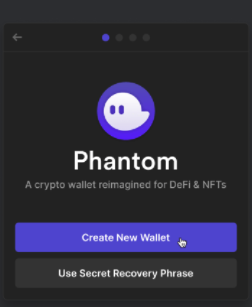
- If you are a brand new Solana user, select "Create New Wallet". If you are an existing Solana user coming from sollet, you can follow steps here to migrate your existing wallets to Phantom.
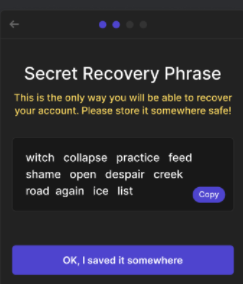
Store your "Secret Recovery Phrase" in a safe and secure location, it is the only way to recover your wallet. At no point will a member of the Phantom team ever ask you for this phrase. Whoever has access to this phrase has access to your funds.
- Look for the Phantom icon in your browser's toolbar.

If you are using Chrome, it will be on the top right-hand side of your browser. If you don't see it look for a "puzzle piece" icon and click on it to access a list of installed extensions. There you should find Phantom, click on the "pin icon" to make it easier to find in the future.
How to stake Solana (SOL) with Phantom Wallet?
- Once you have some SOL in your wallet, click on the Solana token balance in your wallet.
- Then click the "Start earning SOL" button

- Next, choose a validator to stake with.
- Choose an amount and then click "Stake"!


