
Fiat currencies
Crypto Currencies
No results for ""
We couldn't find anything matching your search.Try again with a different term.
Trading using Convert

Convert allows you to directly exchange crypto to crypto, even if there is no exclusive market.
Where to find Convert
The Buy/Sell/Convert widget is available in the Wallets, Explore, and Transactions tabs in Basic and Advanced views. This feature is only available on the web version of our site, and is not available on the mobile application.

This widget will be located on the right side of your screen. Convert has been added as a third tab to the widget.
How to use Convert
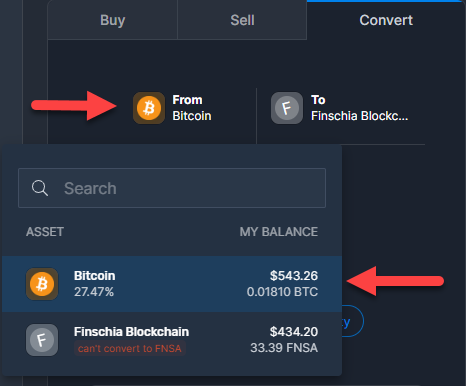
Once you have navigated to the Convert tab, you will need to choose the cryptocurrency you would like to convert from. Click the ‘From’ box under the convert tab. From here you can choose the crypto you would like to convert from. Only coins you currently own are available for the Convert feature. You can also search for a specific coin.
In the example below we chose BTC.
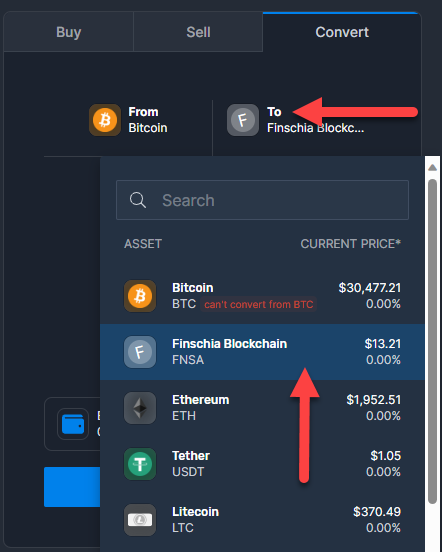
Next, choose the crypto you would like to convert your selected cryptocurrency into by selecting the ‘To’ tab. In the example below we chose to convert BTC to FNSA. If the two currencies you would like convert don't have market with a common quote currency or a direct market, then you cannot convert between the two. If you cannot convert, we will show you a "can't convert" message.
Once you’ve determined your From and To coin types there are three methods to convert from one crypto to another; Quantity, USD/EUR value, and Percentage. We’ll discuss the three methods below.
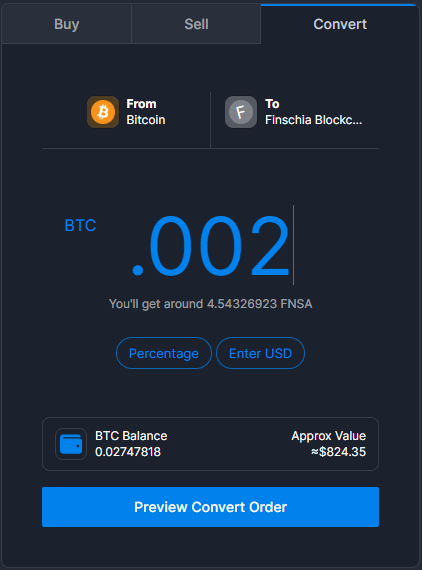
- Quantity: This method allows you convert one coin to another using a specific Quantity of the coin you would like to convert.
- In the example below we convert .002 BTC to FNSA
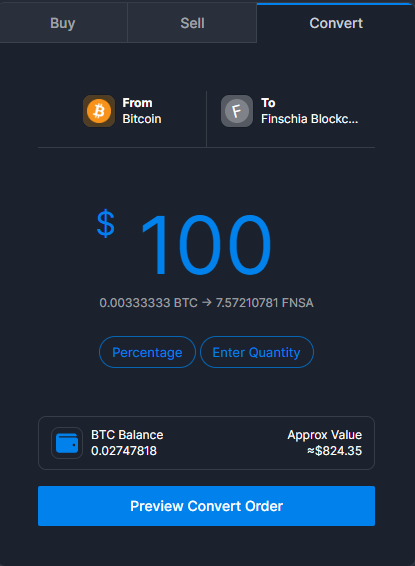
- USD/EUR Value: This method allows you to enter a specific amount in USD or EUR of the coin you would like to convert to a new crypto.
- In the example below we convert the equivalent of $100 USD of BTC to FNSA.
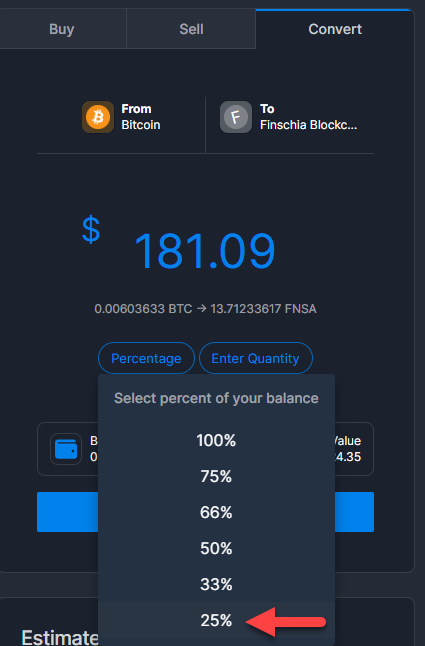
- Percentage: This method allows you to choose a percentage of your total holdings of the coin you wish to convert.
- In the example below we convert 25% of our total BTC holdings to FNSA.
Using one of the three methods above, once you click 'Preview Convert Order' you have 60 seconds review the order and click 'Convert Now'. If you do not click Convert Now within 60 seconds, the price will be recalculated.

After you click 'Convert Now' you will see the following screen. You have now completed your Convert order.

Order History
Your transaction history can still be found under the Transaction tab on the upper right. When you navigate to Order History, you will see all your Buy, Sell, and Convert orders in one place.


Stay tuned to CoinCarp Social Media and Discuss with Us:
X (Twitter) | Telegram | Reddit
Download CoinCarp App Now: https://www.coincarp.com/app/


