
Fiat currencies
Crypto Currencies
No results for ""
We couldn't find anything matching your search.Try again with a different term.
The Beginner's Guide to Copy Trading (Copy Trading User)

What is Futures Copy Trading?
Note: The term "same strategy" here refers to trading futures with opening prices and closing prices that are almost identical to those of the trader's transaction. As the prices may be affected by factors such as market fluctuation, please be aware of the risks as the opening/closing price may not be exactly identical to those of the trader's transaction.
What are the benefits of Copy Trading?
- Trader: Through the system, traders can put their professional trading experience to good use and earn up to 15% profit share from their followers' trades.
- Follower: With just a few simple steps, the system will automatically copy the selected trader's trading strategy and place an order for the follower. Followers will never miss out on another trading opportunity even when they are busy.
How to start Copy Trading?
A mandatory field. The following amount is the funds invested in the current Copy Trading sub-account, which will be used as a margin to open a position when following a trader. The minimum investment is 5 USDT, where the maximum investment amount is based on the USDT balance of the main Spot account.
b. Select Copy Trading mode (Fixed amount mode or Multiplier mode)
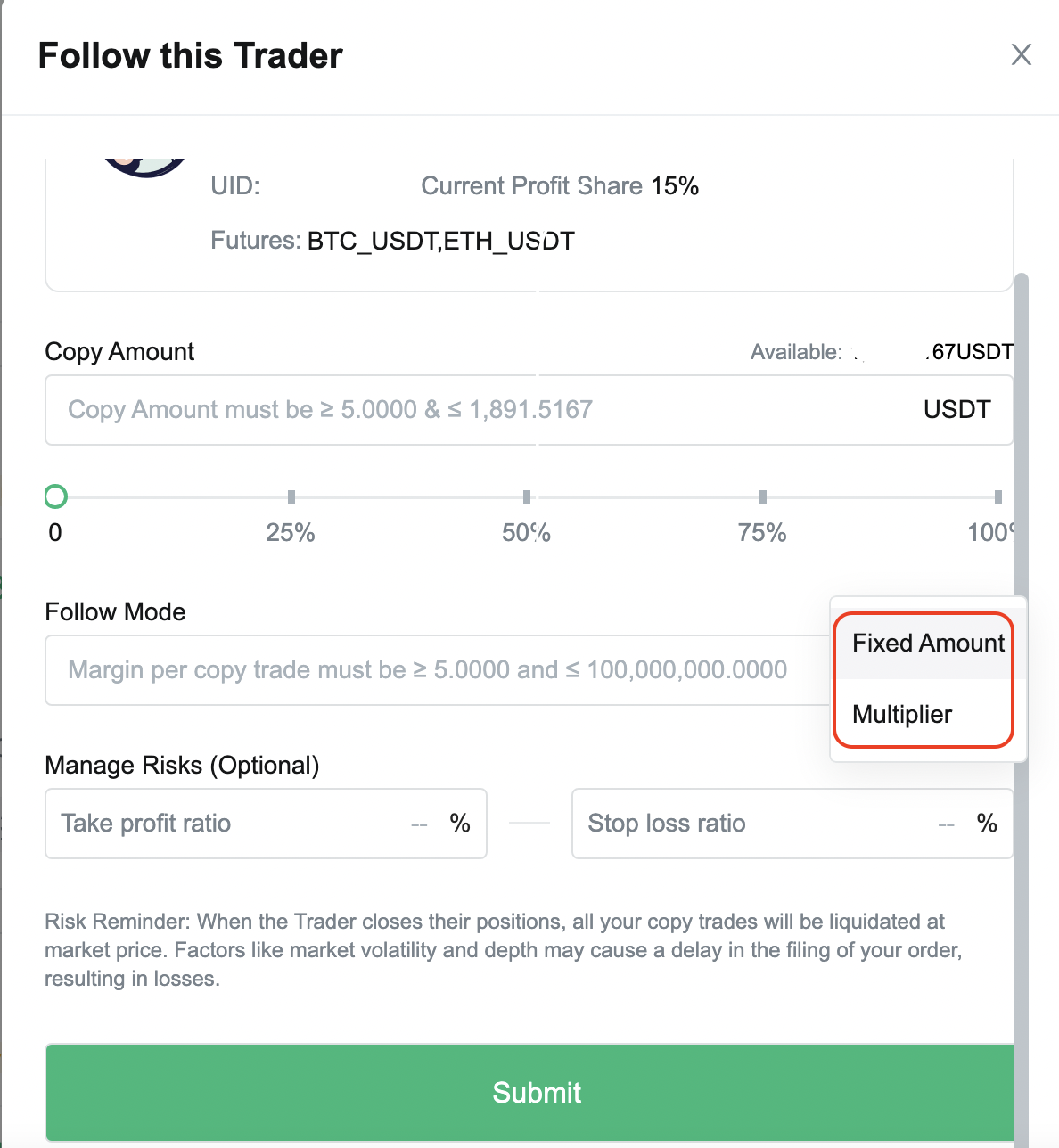
- If you select Fixed amount mode, you need to enter the investment amount for each time you copy a trade.
For example, when it is fixed at 100 USDT, it means that each time the trader opens a position, the system will place an order for you with a margin of 100 USDT.
- If you select Multiplier mode, you need to enter the ratio for each time you copy a trade (ratio of your copied trade position to the trader's position).
For example, you follow trader A and set the ratio to be 10x. When trader A leads a copy trade with the transaction of 10 USDT, the amount you need to invest in this order will be 10 * 10 = 100 USDT.
- Go to Copy Trading page, under My Copy Trades, and check and manage current copy trades (if exist).
- You can set up the take profit/stop loss ratio for a position.
- Click on [Close] to manually end copy trade and close the position, or you may also wait for your position to close automatically when the trader closes their position.
- Click [History], Copy Trade History, to view the PNL of your closed positions.
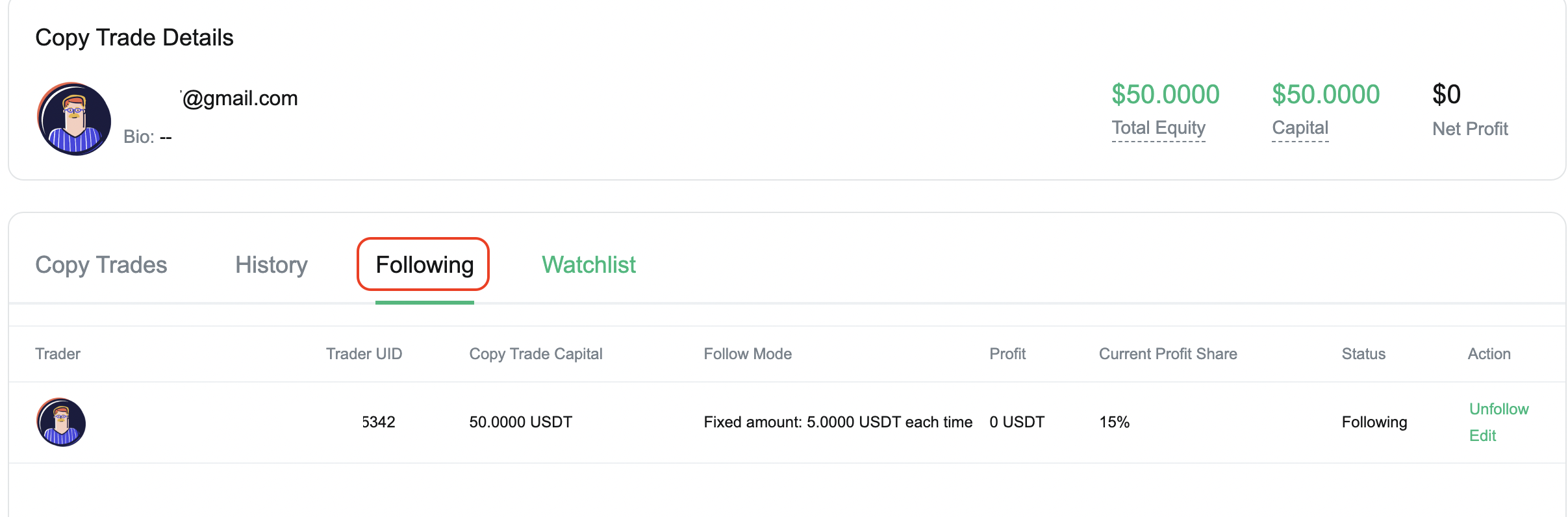
How to check my following traders?
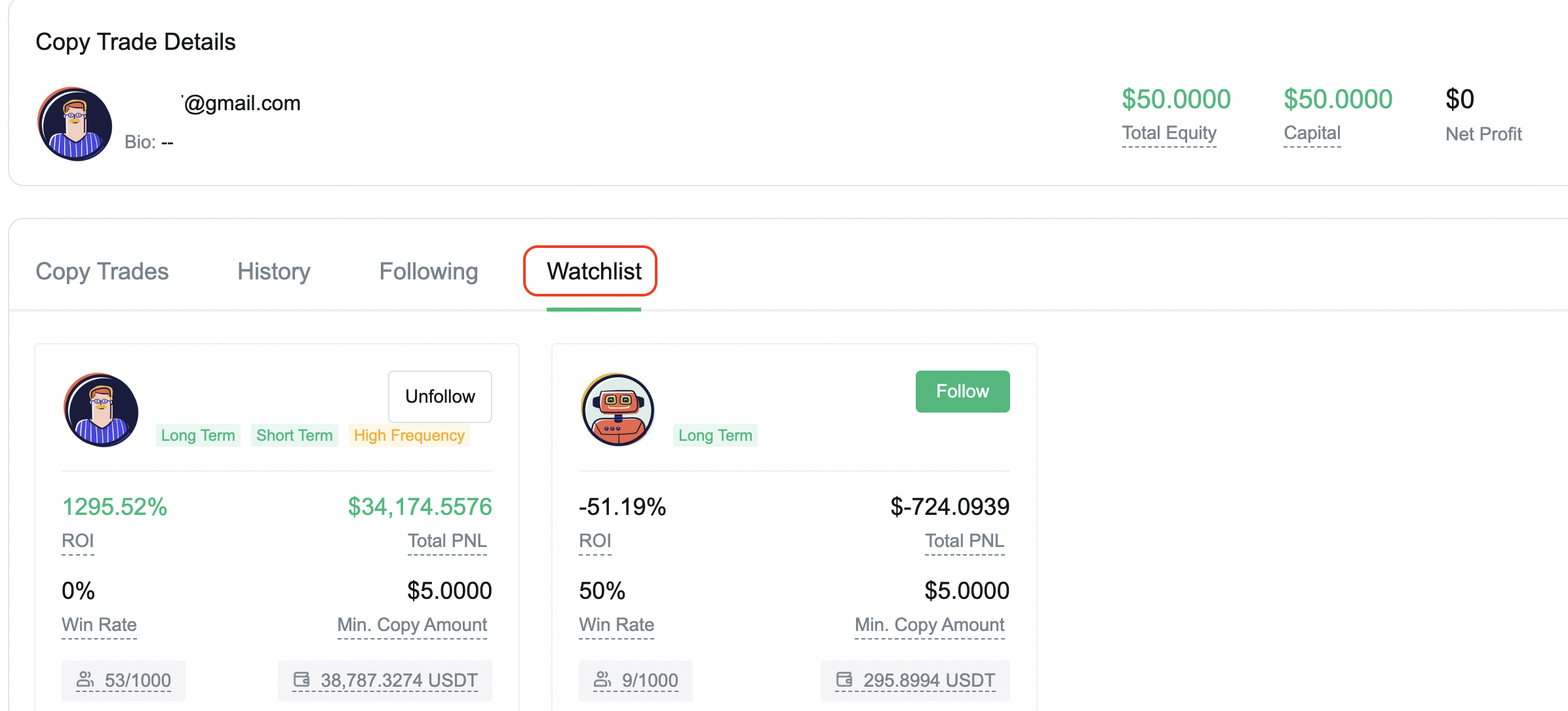
How to check the traders on my watchlist?
How do you unfollow a trader?
- Go to My Copy Trades
- Click on [Following]
- Select a trader you are following, and click on [Unfollow] in the action panel.
Note: Once you unfollow a trader, the funds in your Copy Trading sub-account will immediately be transferred to the spot account of your main account. You may go to Assets page, click on [Quantitative account], then click on [Transfer details] to view the transfer records
How to edit Copy Trading details?
- Go to My Copy Trades
- Click on [Following], select a trader you are following
- Click on [Edit] in the action panel
- Click [Submit] when you are done editing your Copy Trading details
MEXC Copy Trade >>>

[MEXC] Copy Trading Survey - Grab bonuses up to 1,000 USDT! >>>
Find us on
Telegram:https://t.me/MEXCEnglish
MEXC ETF:https://t.me/MEXCETFCommunity
MEXC Futures:https://t.me/MEXCFutures
MEXC Derivatives:https://twitter.com/MEXCDerivatives
Twitter:https://twitter.com/MEXC_Global
Facebook:https://www.facebook.com/mexcglobal
Instagram:https://www.instagram.com/mexcglobal/
Medium:https://medium.com/mexcglobal
Discord:https://discord.gg/agZNfksc2T
Buy USDT Instantly Here:https://otc.mexc.com/
Create your own referral link today and start inviting friends to enjoy great rebates:
https://www.mexc.com/invite
Enjoy trading on MEXC.
The MEXC Team
8 September 2022
Stay tuned to CoinCarp Social Media and Discuss with Us:
X (Twitter) | Telegram | Reddit
Download CoinCarp App Now: https://www.coincarp.com/app/


