
Seclect Currency
Fiat currencies
Crypto Currencies
No results for ""
We couldn't find anything matching your search.Try again with a different term.
How to deposit Bitcoins in your OKX Wallet?

To join our BTC Machine Airdrop and meet our claim requirement, you need to have at least 0.001 Bitcoin credited on your OKX Wallet. Follow the next 3-step guide to get on board our event~
1. Download OKX Wallet
You can download and install OKX WalletWeb extension or App ➡️ HERE.
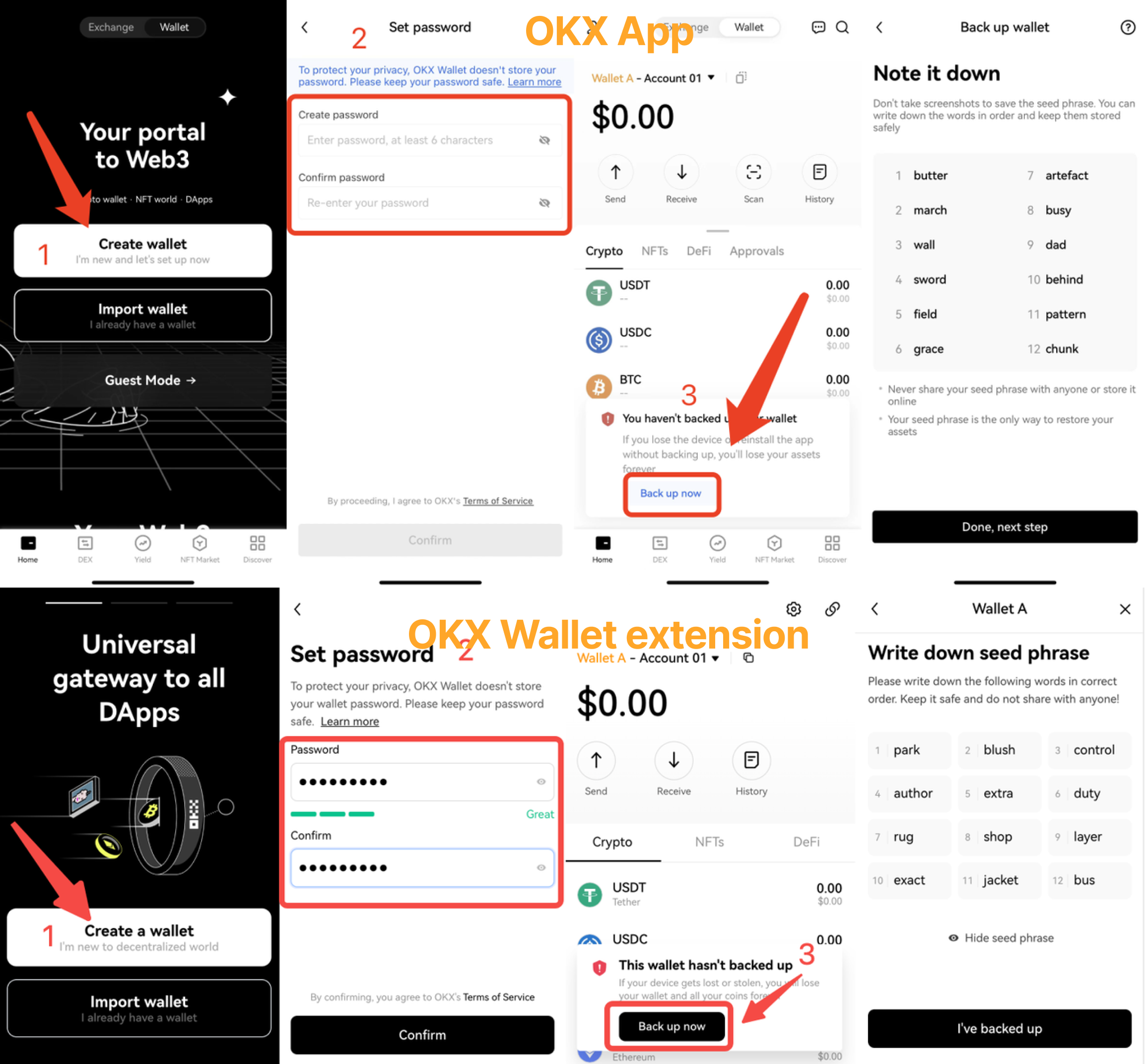
2. Create a wallet or add an existing wallet
[1] Open the application you just installed(if you're using OKX App, switch to Wallet), select Create wallet;
[2] Create your own password;
[3] Back up your seed phrase (aka. Recovery phase).
If you already have a wallet, import your existing wallet into OKX Wallet, using your wallet's seed phrase or private key.
[1] Click Import wallet, select seed phrase or private key, and enter it;
[2] Entering the seed phrase or private key;
[3] Go to the Set password page, enter your password, and complete importing.

Note: for your assets' safety, keep your seed phrase and password safe and never share them with anyone.
3. Add BTC to your OKX Wallet
Click the Copy address icon on the Bitcoin address to copy this address. Now, you can transfer your Bitcoin from exchange or other wallets to the address you just copied.

If you have BTC in your OKX exchange account, click Receive on the Wallet homepage and find Withdraw from Exchange.Select the BTC crypto and Bitcoin network, enter an amount, and complete security verification to withdraw. (App Only)

Stay tuned to CoinCarp Social Media and Discuss with Us:
X (Twitter) | Telegram | Reddit
Download CoinCarp App Now: https://www.coincarp.com/app/


