
Fiat currencies
Crypto Currencies
No results for ""
We couldn't find anything matching your search.Try again with a different term.
How to verify if your assets are included in the OKX Merkle tree?

What's a Merkle Tree?
A Merkle Tree (or Hash Tree) is a data structure, which is normally a binary tree, it uses predefined functions to calculate hash value of a node from bottom up, to the top root node of the tree.
Definition of OKX Merkle Tree
Node Information
Every tree node stores such information: 1. Hash value of the node; 2. Crypto currency amount of a user captured by the audit snapshot (take BTC, ETH, USDT as an example)
hash value,{"BTC":"BTC amount","ETH":"ETH amount","USDT":"USDT amount"}
be324cf06aee0616b4ec20c3,{"BTC":"1.023","ETH":"0","USDT":"20.2343322"}
Hash Rule
- Leaf Nodes (except padding nodes)
hash=SHA256(nonce balances)
OKX will assign one unique nonce for each user, which can be found on the user's audit page; balances is a json String composed of users' assets and amounts that were captured by the audit snapshot, for example: {"BTC":"1.023","ETH":"0","USDT":"20.2343322"} (NOTE: need to get rid of the trailing zeroes, and keep 8 decimals of precision)
Parent Nodes
hash of a parent node = SHA256(h1 h2 (h1 BTC amount h2 BTC amount) (h1 ETH amount h2 ETH amount) (h1 USDT amount h2 USDT amount) height)
h1=Hash of the current node's left child node, h2=Hash of the current node's right child node, audit_id=ID of the current audit, height=the height of node h1 (or h2)
Definition of height: height of the bottom leaf node=1, height of a parent node=height of its child node 1, root node has the maximum height
Padding Nodes Rule
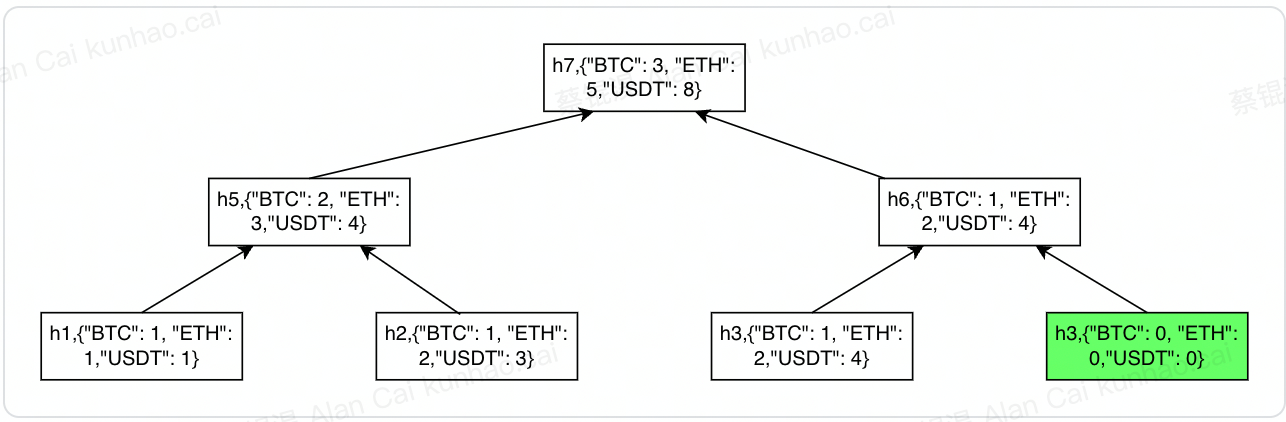
To construct a full Merkle tree (a full binary tree), it requires 2^n leaf nodes, but the actual data might not meet such requirement and there could also be an odd number of data. In such circumstances, if node k doesn't have sibling node, one sibling node k' will be automatically generated as a padding node, such that hash(k')=hash(k), and the asset amounts will be set to 0 for all currencies.
e.g.
Hash | balances |
h1 | {"BTC": 1, "ETH": 1,"USDT": 1} |
h2 | {"BTC": 1, "ETH": 2,"USDT": 3} |
h3 | {"BTC": 1, "ETH": 2,"USDT": 4} |
In this example, padding node h4=h3, and balances stored in the node is {"BTC": 0, "ETH": 0,"USDT": 0} as shown in below Picture 1 (green node):
Picture 1:
hash of a parent node = SHA256(h1 h2 (h1 BTC amount h2 BTC amount) (h1 ETH amount h2 ETH amount) (h1 USDT amount h2 USDT amount) height)
So: h6 = SHA256(h3 h3 (1 0) (2 0) (4 0) height)
How to verify if your assets are included in the OKX Merkle tree?
Verification theory
- Example: refer to Picture 1 and below json text, based on user's self node h3 and provided its sibling node h4, the hash of their parent node h6 can be calculated, and provided h6's sibling node h5, the hash of their parent node h7 can be calculated, then compare h7's hash value with the one collected in the merkle tree path root node and see whether they are identical to complete the verification process.
{
 "self": {
  "balances": {
   "BTC": "1",
   "ETH": "1",
   "USDT": "1"
  },
  "nonce": "aa8442ee975df827dc14e527e3ea01db71fe5a6cfe867d77f6a4148fc492743c",
  "hash": "ca080cc4b04630c9e667e3177be7b093af743101a300cd737dd2da6dbe801be6",
  "type": 1,
  "height": 1
 },
 "path": [{
  "balances": {
   "BTC": "1",
   "ETH": "2",
   "USDT": "3"
  },
  "hash": "7d16e6b5203299b85498aa35b964c83903a933d549f99ff3ca8b20c243c2be3e",
  "type": 2,
  "height": 1
 }, {
  "balances": {
   "BTC": "1",
   "ETH": "2",
   "USDT": "4"
  },
  "hash": "4d6376b3a51693be961dd402b620c3f2536cb3f7275629fa23e2d1c6c7b319db",
  "type": 2,
  "height": 2
 }, {
  "balances": {
   "BTC": "3",
   "ETH": "5",
   "USDT": "8"
  },
  "hash": "af1787033e8d32d600e2e40dc616c1f8d4271e1c182ed57b6e9585e1ac5aa959",
  "type": 3,
  "height": 3
 }]
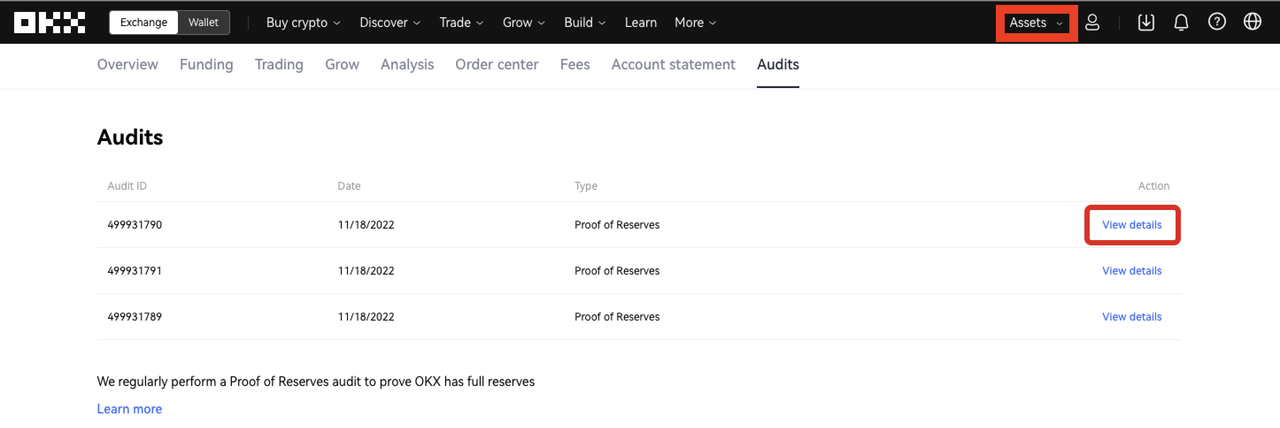
}1. To verify if the asset balance of your account has been included as a Merkle leaf, log in to your OKX account, click "Assets' and visit "Audits" to view recent audits, click "View details" to view your audit data.
2. You can also manually verify your assets in the Merkle tree by following the steps in our guide. Get the data you need for manual verification by clicking "Copy data".
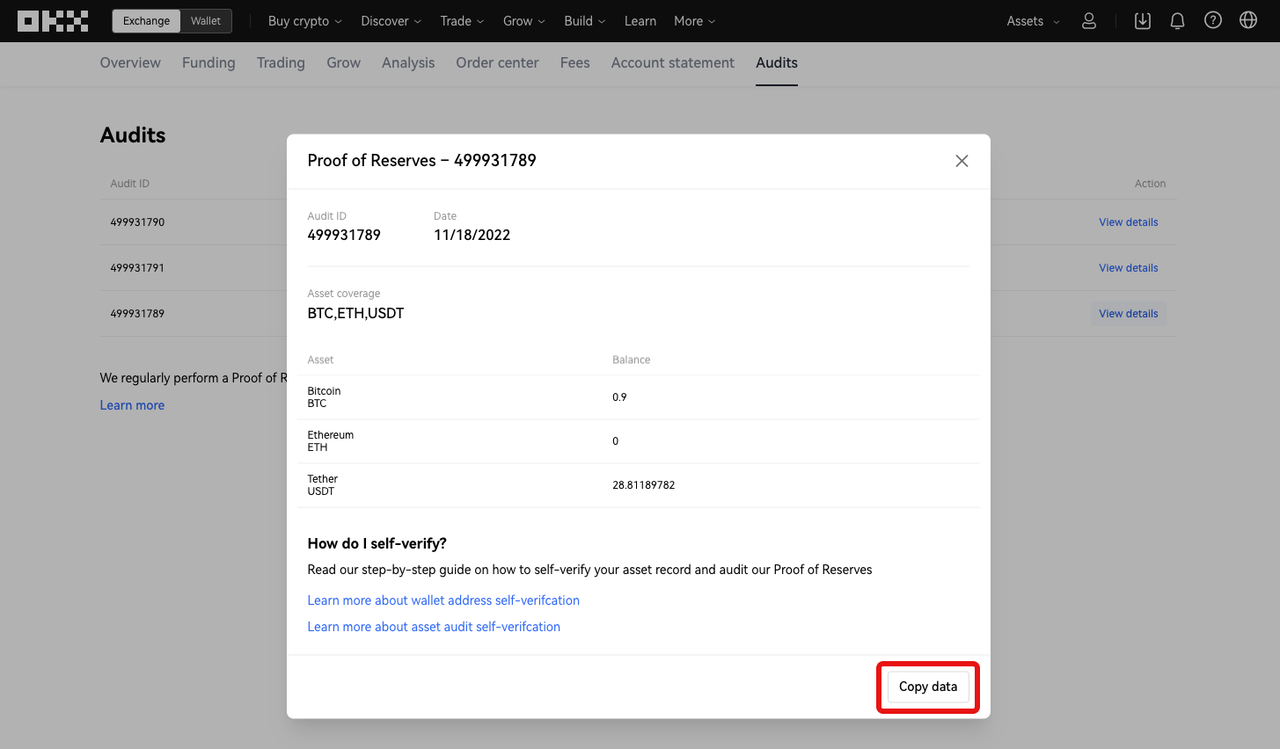
3. After clicking "Copy data", open the text editor (e.g: notebook) , then paste and save the json String as a json file.
Operational steps:
Mac : Open the terminal, enter command touch merkle_proof_file.json, and then a json file will be created. The file is saved in the system desk by default, you can open Finder and search for merkle_proof_file.json to find this file. Open this json file, paste the copied data, and save it.
Windows: Double-click to open a text editor (e.g: notebook), paste the data and save it as a json file.
In our case, we name the file "merkle_proof_file.json". Merkle tree path data json text is shown as below:
{
 "self": {
  "balances": {
   "BTC": "1",
   "ETH": "1",
   "USDT": "1"
  },
  "nonce": "aa8442ee975df827dc14e527e3ea01db71fe5a6cfe867d77f6a4148fc492743c",
  "hash": "ca080cc4b04630c9e667e3177be7b093af743101a300cd737dd2da6dbe801be6",
  "type": 1,
  "height": 1
 },
 "path": [{
  "balances": {
   "BTC": "1",
   "ETH": "2",
   "USDT": "3"
  },
  "hash": "7d16e6b5203299b85498aa35b964c83903a933d549f99ff3ca8b20c243c2be3e",
  "type": 2,
  "height": 1
 }, {
  "balances": {
   "BTC": "1",
   "ETH": "2",
   "USDT": "4"
  },
  "hash": "4d6376b3a51693be961dd402b620c3f2536cb3f7275629fa23e2d1c6c7b319db",
  "type": 2,
  "height": 2
 }, {
  "balances": {
   "BTC": "3",
   "ETH": "5",
   "USDT": "8"
  },
  "hash": "af1787033e8d32d600e2e40dc616c1f8d4271e1c182ed57b6e9585e1ac5aa959",
  "type": 3,
  "height": 3
 }]
}
4. Download the OKX open-source verification tool(MerkleValidator)
5. Save OKX open-source verification tool (MerkleValidator) and the data file (merkle_proof_file.json) in the same folder. In our case: we put the tool as well as the data file under folderDownloads, named proof-of-reserves, as shown below:

6. Open the terminal application (Mac: Terminal; Windows: Command Prompt)
7. Run the command and locate to the directory of the downloaded folder, in our case, enter the command: cd ~/Downloads/proof-of-reserve
8. Type below command and enter to start the verification:
Mac
1 ./MerkleValidator --merkle_proof_file merkle_proof_file.json
Windows
1 MerkleValidator.exe --merkle_proof_file merkle_proof_file.json
9. Check the result
If the verification passes, the result "Merkle tree path validation passed" will be shown as below:

If the verification fails, the result "Merkle tree path validation failed" will be shown as below:

10. You can also refer to the code of the OKX open-source verification tool(MerkleValidator) and OKX merkle tree definition("What's a Merkle Tree?"), write program yourself to verify that your assets are captured by the merkle tree built from the audit snapshot, using the merkle tree path data collected in step 2.
Stay tuned to CoinCarp Social Media and Discuss with Us:
X (Twitter) | Telegram | Reddit
Download CoinCarp App Now: https://www.coincarp.com/app/


