
Seclect Currency
Fiat currencies
Crypto Currencies
No results for ""
We couldn't find anything matching your search.Try again with a different term.
OKX DEX User Guide (Web)

OKX DEX is a one-stop, multi-chain, and cross-chain trading aggregator. Through X Routing, the smart routing algorithm, OKX DEX finds the best route to place an order across different DEXs. By comparing prices across liquidity pools and splitting orders, it provides users with the best trading prices with minimal slippage, and lower network gas fees in multi-chain and cross-chain scenarios.
OKX DEX supports over 10 chains, 100 DEXs, and offers over 100,000 crypto assets in one place, which allows it to provide efficient, smooth, and economical multi-chain transaction services. OKX DEX's innovative 'Swap for gas' feature allows users to pay for network fees without needing to transfer additional funds from other places, making it easier to swap crypto across different blockchains. Read the tutorial below to learn how to use OKX DEX.
Step 1: Connect your wallet
Open the OKX official website, switch to Wallet, click Connect wallet, and enter your password to log in. The website currently supports OKX Wallet, MetaMask, etc. to connect directly. Connecting via WalletConnect is also supported. If you don't have a wallet, we recommend you use OKX Wallet for the best experience.
1. Install the OKX Wallet web extension
Download from Chrome web store at: https://chrome.google.com/webstore/detail/okx-wallet/mcohilncbfahbmgdjkbpemcciiolgcge
Download from Firefox browser Add-ons at: https://addons.mozilla.org/en-US/firefox/addon/okexwallet/
Download from Microsoft Edge Addons at: https://microsoftedge.microsoft.com/addons/detail/okx-wallet/pbpjkcldjiffchgbbndmhojiacbgflha
2. Create or import a wallet
[1] Open the OKX Wallet web extension, select I don't have a wallet;
[2] Create your own password;
[3] Back up your seed phrase (aka. Recovery phase or backup password).
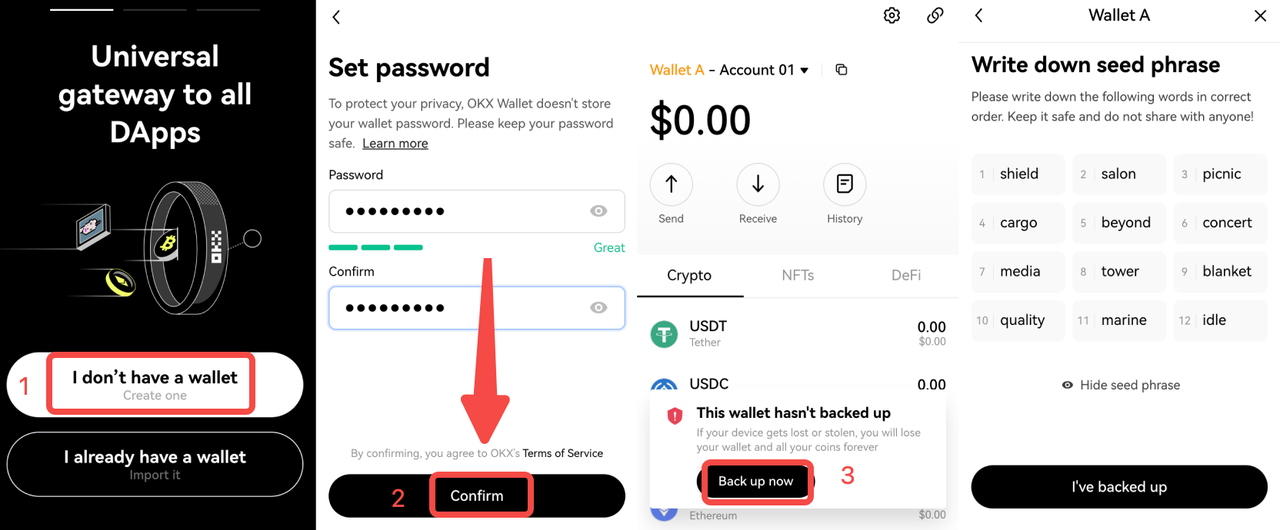
If you already have a wallet, import your existing wallet into OKX Wallet, using your wallet's seed phrase or private key.
[1] Click I already have a wallet;
[2] Select Seed phrase or Private key, and enter it;
[3] Go to the Set password page, enter your password and confirm to complete importing.
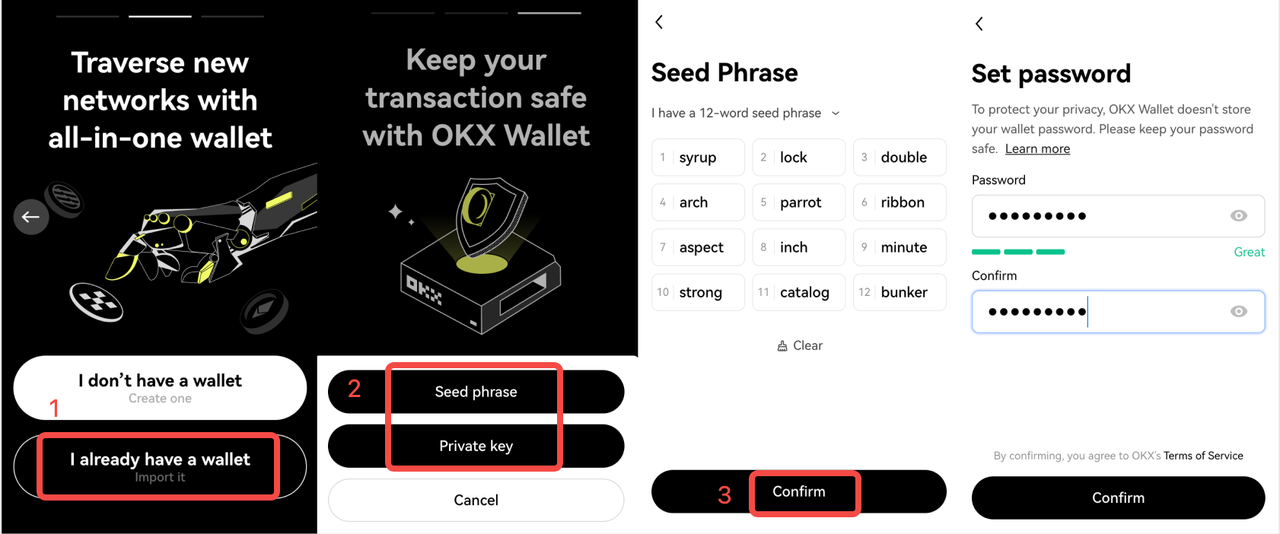
Please note: for your assets' safety, keep your seed phrase and password safe and never share it with anyone.
Step 2: Token market
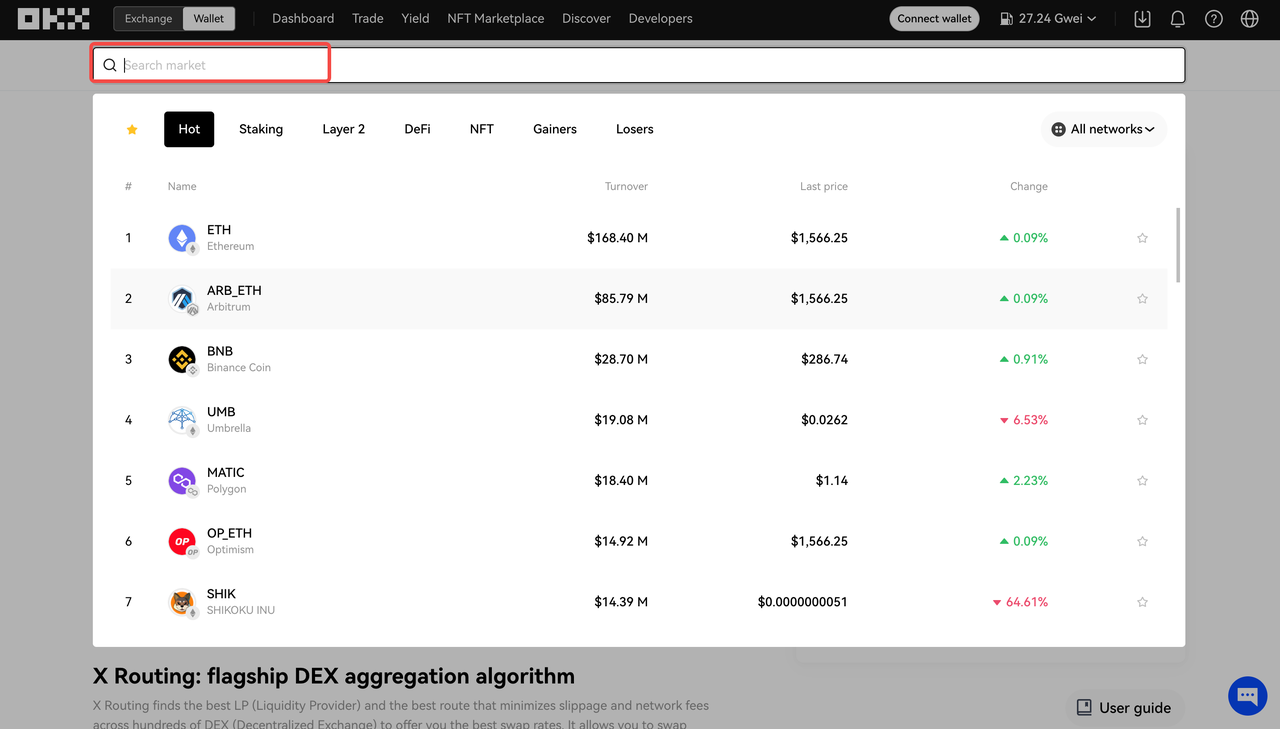
OKX DEX has launched the Token market feature, aiming to help you discover hot tokens anytime, anywhere. Click Trade to access the DEX page, click the search box in the upper left corner to view the lists of top-ranking tokens under different categories, such as Hot, Layer 2, DeFi, and view their price, change, and trading volume. Click any token on the list to start trading it.
Step 3: View the token's price chart
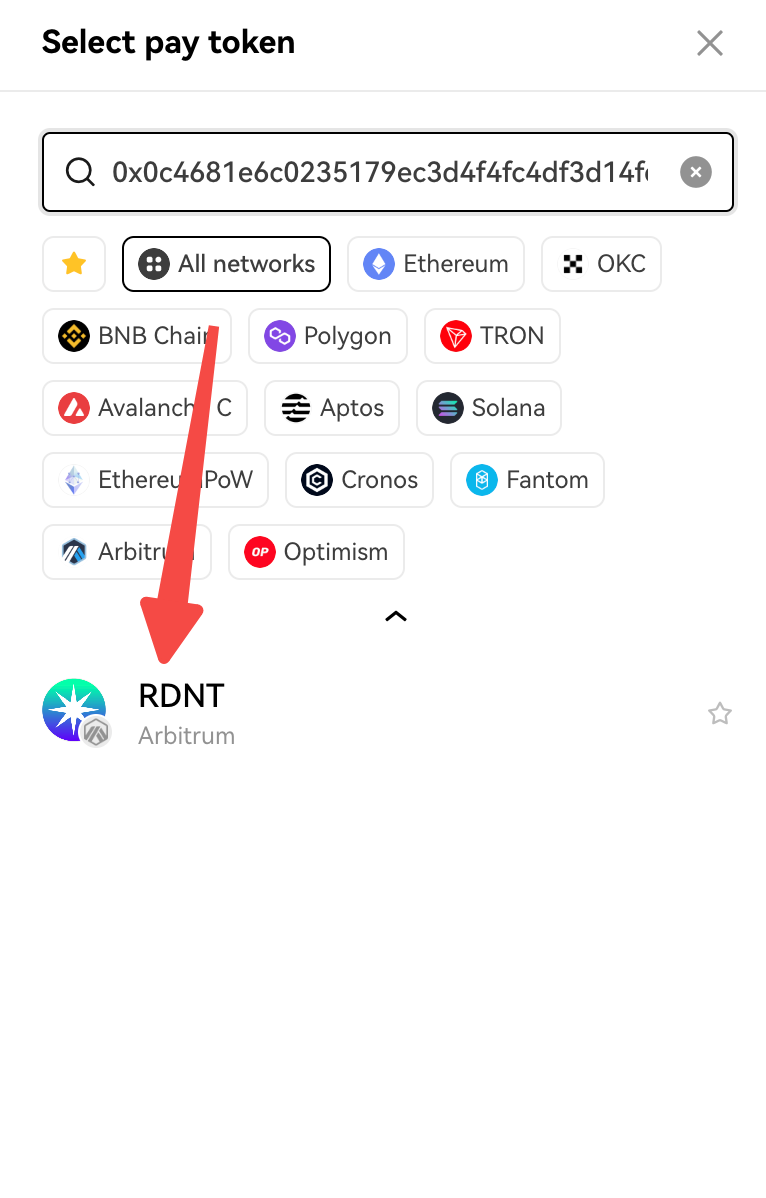
Search by token name, symbol, or contract address at Pay or Receive, and select a network. If too many tokens appear after entering a token's name, and the authenticity can't be determined, you can use CoinGecko to check. Enter the token name in the search box and copy the address in the Contract column on the token details page. Also, make sure to get the network right.
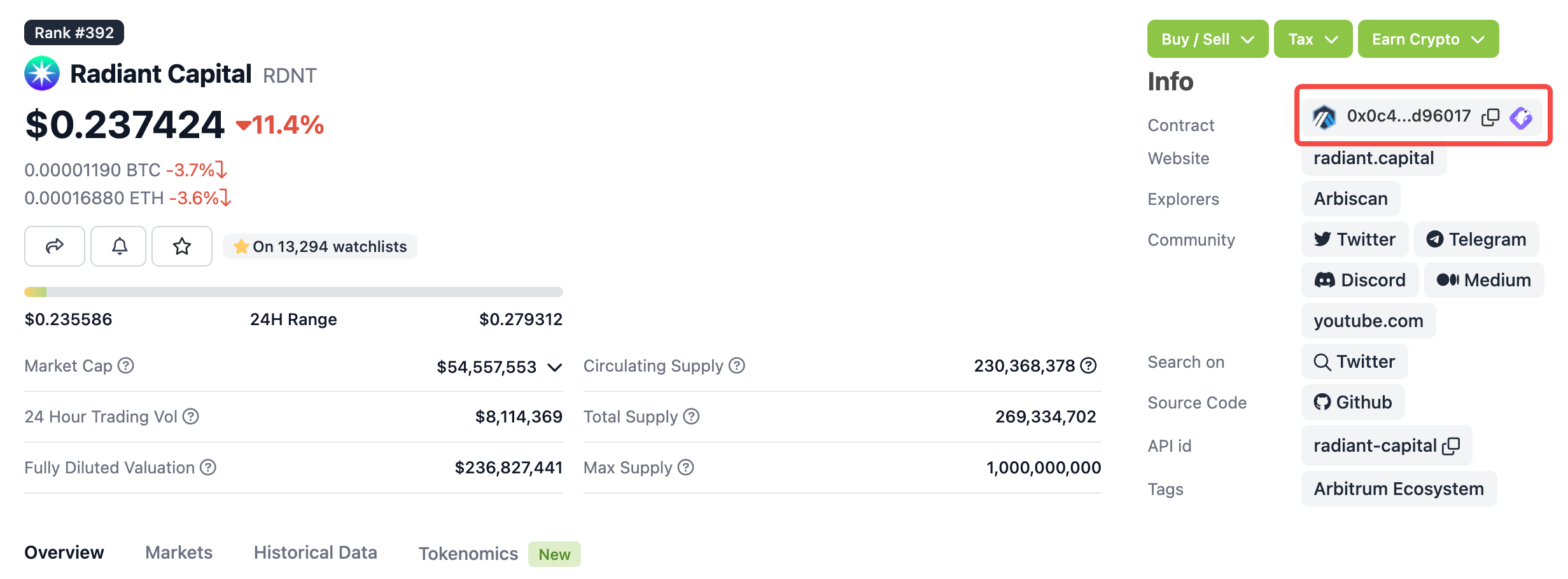
Paste it into the search box in OKX DEX, and click to confirm.
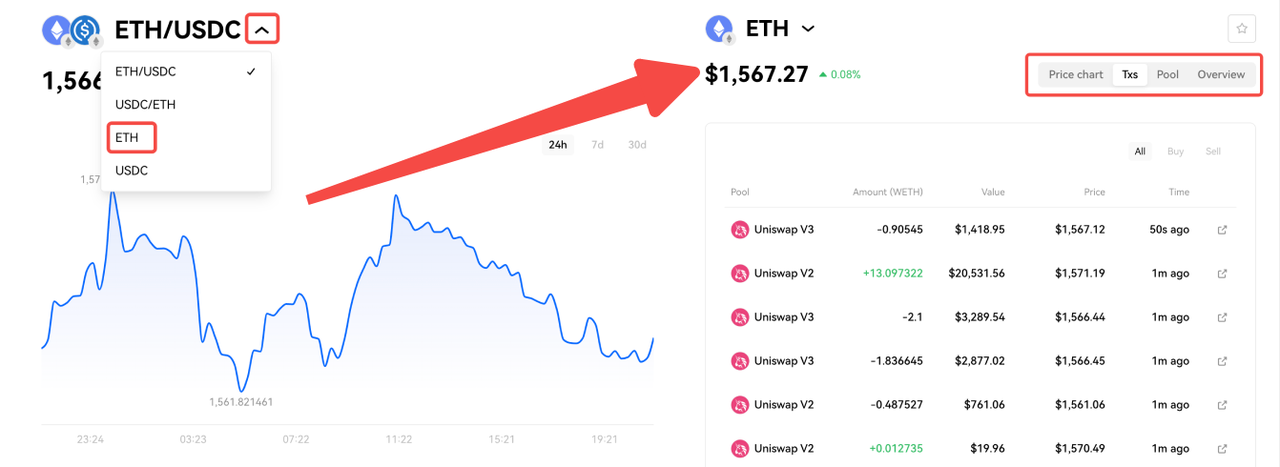
Choose the Pay and Receive tokens, such as ETH and USDC. You can see the price chart and an overview of related tokens on the left side of the screen. The price chart shows the ratio of the Pay token/Receive token by default. Clicking ∨ shows ETH/USDC, USDC/ETH, ETH, and USDC. Click one token, such as ETH, to enter its details page, and it will display the price chart, transaction, pool, and overview.
Step 4: Trade
Click Trade to access the DEX page. OKX DEX supports trading crypto on 13 chains and cross-chain swaps on 9 chains.
1. Swap tokens across chains
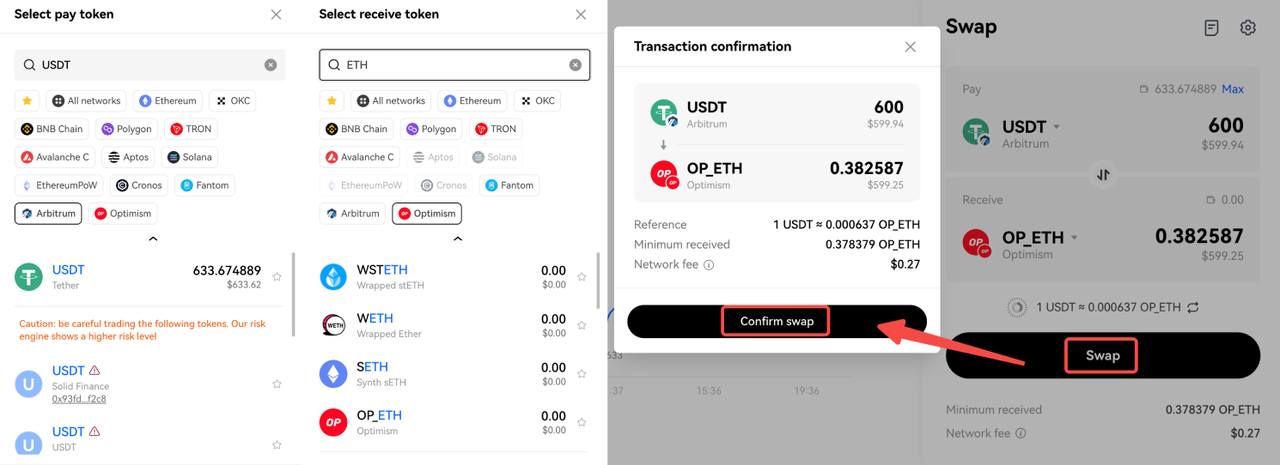
Choose your desired crypto to pay and receive on different networks at Pay and Receive, such as USDT on the Arbitrum network and ETH on the Optimism network. Enter an amount, select Swap, and Confirm in your wallet. Wait for the transaction to be confirmed.
2. Swap tokens on one chain
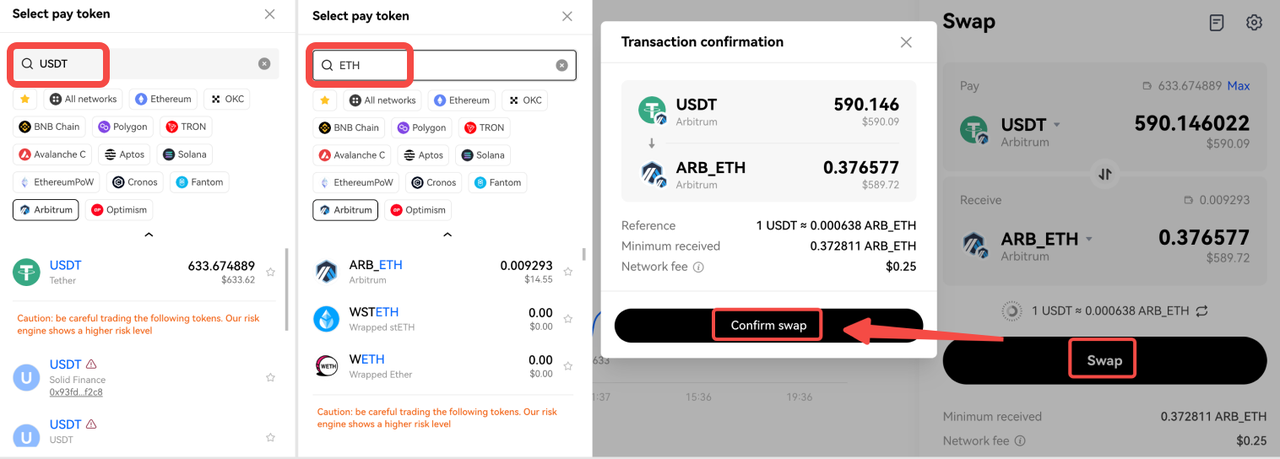
Choose your desired crypto to pay and receive on the same network at Pay and Receive, such as USDT and ETH on the Arbitrum network. Enter an amount, select Swap, and Confirm in your wallet. Wait for the transaction to be confirmed.
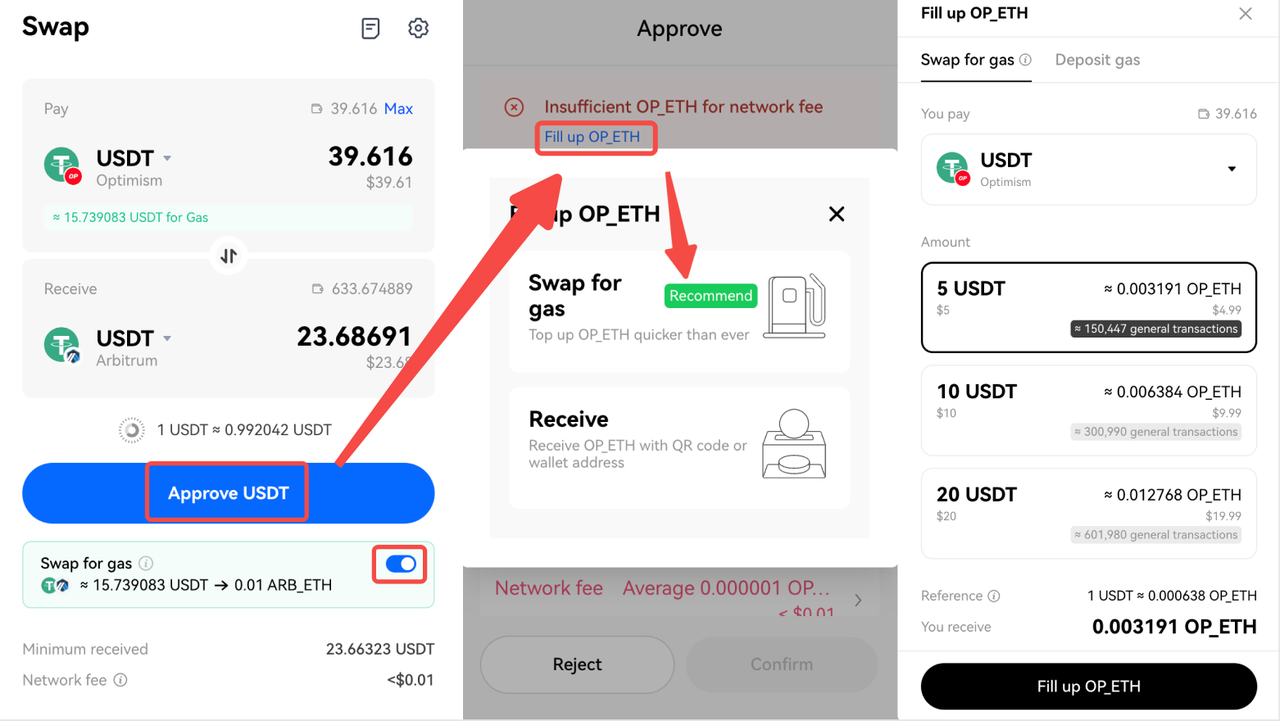
OKX DEX has launched Swap for Gas feature, helping you to simply swap USDT, USDC, DAI, WETH, and other mainstream tokens for native tokens, solving the problem of no gas fee or a lack of gas fee. Currently, it supports transactions on 9 networks: Ethereum, OKC, BSC, Polygon, Fantom, Avalanche, TRON, Arbitrum, and Optimism. You can swap for Gas on one chain or across chains.
For example, you have USDT on Optimism, but no ETH, and you want to swap USDT on the Optimism network to USDT on the Arbitrum network. Choose USDT_Optimism and USDT_Arbitrum at Pay and Receive, click Approve USDT > Fill up OP_ETH, check the Pay token and amount, and then click Fill up OP_ETH. Enter the password to complete the Gas swap.
Step 5: Adjust network fees and slippage tolerance
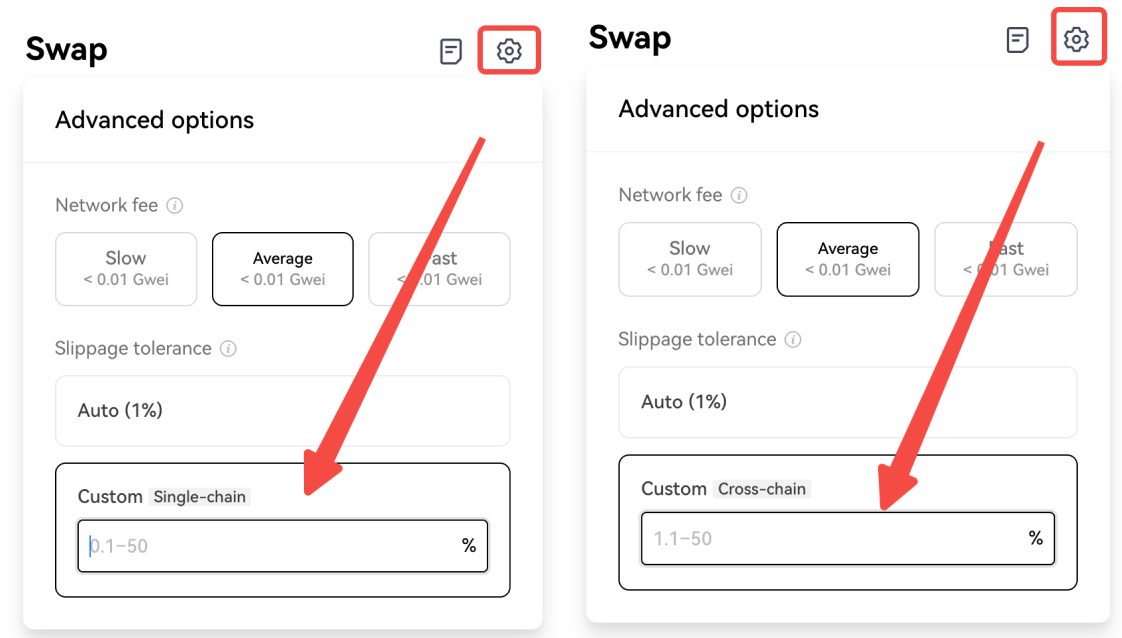
Click the settings icon to enter the Advanced options page, and set network fees and slippage tolerance. OKX DEX currently supports automatic or customized slippage (single-chain, cross-chain). Please note that some tokens require certain levels of slippage. For example, some tokens have low liquidity, and the transaction may fail if you set the slippage tolerance to less than 5%.
Step 6: View transaction history
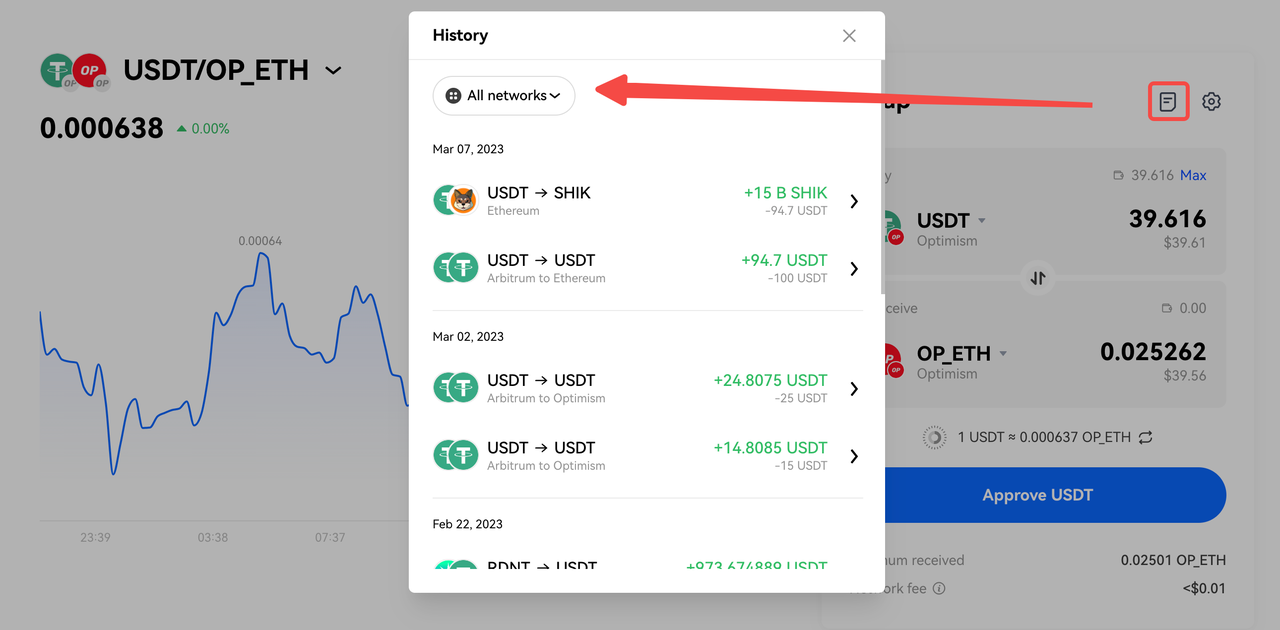
After a transaction is completed, you can click the history icon to view the transaction records or go to the blockchain browser to view the details of a certain transaction. If there are too many transactions, you can also filter by the network to view them more easily.
OKX Team
Mar 10, 2023 (UTC)
PROM
$8.94
15.13%


